Starting manual mode
Proceed as follows:
- You are authorized to start manual mode.
- Actuate the key switch to switch to manual mode.
- The Manual mode menu is displayed.
- In manual mode, both the current actual speed and the setpoint speed are displayed in user units. The speed can be increased or decreased using the double arrow keys on the local keypad.
- Set the setpoint speed [4].
- Observe the set operation mode [7]. To enable the drive, press the <RUN CCW> or <RUN CW> key.
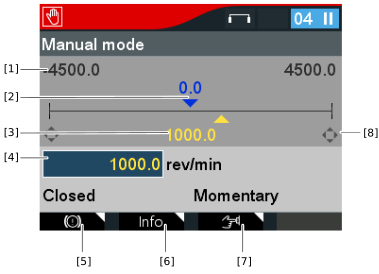

[1] | Application limits of the setpoint speed |
[2] | Display of the actual speed |
[3] | Display of the setpoint speed |
[4] | Input of the setpoint speed |
[5] | Inhibit output stage and release brake/deactivate DynaStop®, see chapter Brake/DynaStop® control |
[6] | For information on the current status, see chapter Displaying the status |
[7] | Selection of momentary or latching operation, see chapter Changing the operating mode |
[8] | Operating cross on the display indicates pressing of the keys |
- The drive rotates at the setpoint speed.
