Inverter
You have the following operating options:
- To select an inverter, select the respective tab [7].
- To connect logically to the selected inverter, press the <OK> key. The start view of the inverter is displayed. You can now use all functions of the keypad, e.g. start up the inverter or display the diagnostics.
- To switch back to the device selection, press 4. <Esc> function key.
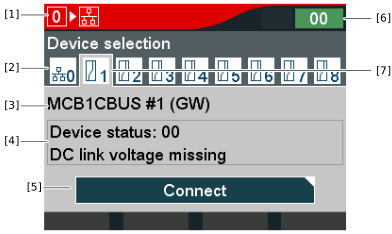

[1] | Device address to which the CBG21A keypad is connected. The gateway has the device address "0". |
[2] | Gateway tab |
[3] | Device designation of the inverter. If the device designation is empty, the device identification is displayed. |
[4] | Status of the inverter. |
[5] | Connect button |
[6] | Display: The MOVITRAC® gateway has no device fault. |
[7] | Tab of the selected inverter. |
