Brake/DynaStop® control

WARNING

Uncontrolled system behavior when the brake is released.
Severe or fatal injuries, e.g. due to falling hoist.
- Make sure that the system does not automatically start moving when the brake is released.
- Make sure that in lifting applications unintentional lowering of the load is prevented by suitable preventive measures.
The brake/DynaStop® control allows you to release the brake or deactivate DynaStop®, if available.
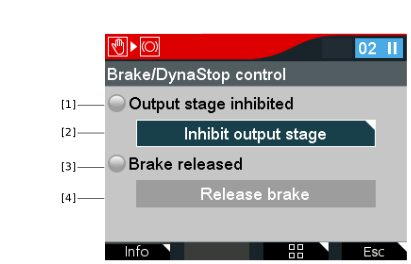

[1] | LED symbol: Active state of Output stage inhibited |
[2] | Inhibit output stage button |
[3] | LED symbol: Active state of Brake released |
[4] | Release brake button: The brake is electrically controlled and released. |
- In the Manual mode menu, select the Brake/DynaStop control icon.
- Confirm with the <OK> key.
- Select the Inhibit output stage button.
- Press the <OK> key.
- The following query is displayed: "Do you really want to inhibit the output stage? If the output stage is inhibited, the drive will not generate any torque."
- Press the <OK> key.
- Select the Release brake button and press the <OK> key.
- The following query is displayed: "Do you really want to release the brake/deactivate DynaStop®? Without mechanical brake/DynaStop® function, the drive can move freely.
- Press the <OK> key.
