Cycle mode
Cycle mode is used to move a certain distance relatively further and further.
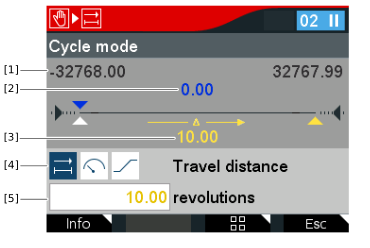

[1] | Position of the software limit switches/application limits |
[2] | Relative actual position |
[3] | Relative setpoint position |
[4] | Symbols for selecting setpoints |
[5] | Setpoint input |
- In the Manual mode menu, select the Cycle mode icon.
- The following query is displayed: "Do you want to start manual mode?"
- Confirm with the <OK> key.
- The Cycle mode window is displayed.
- Set the following setpoints [3]. Changes to the values have a direct effect on the drive.
Symbol | Description |
|---|---|
| Enter the desired travel path in user units, e.g. rev. |
| Enter the desired setpoint speed in user units, e.g. rev/min. |
| Enter the desired setpoint acceleration/setpoint deceleration in user units, e.g. rev/(min*s). |


- To start cycle mode, press the green <RUN> key.
- To stop cycle mode, press the red <STOP> key.
- To stop manual mode, press the <Esc> key.
- The following query is displayed: Do you want to stop manual mode? Warning! An applied setpoint will be active again after stopping manual mode.
- Before stopping manual mode, check that there are no persons in the area of rotating parts.
- Confirm with the <OK> key.
- Manual mode has been stopped and pending setpoints become active again.
