Reference travel
To use the positioning-controlled manual mode, you must first reference the drive.
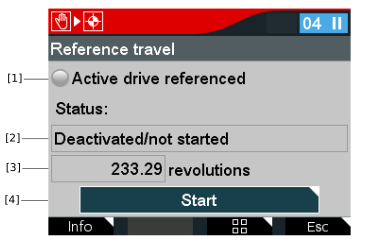

[1] | The LED icon indicates whether the active drive is referenced. |
[2] | Reference travel status |
[3] | Actual position |
[4] | The Start button is preselected. |
- In the Manual mode menu, select the Reference travel icon.
- The following query is displayed: "Do you want to start manual mode?"
- Confirm with the <OK> key.
- The "Reference travel" window is displayed.
- To initiate the reference travel, press the <OK> key.
- If the reference travel has been completed successfully, this is indicated by the green LED symbol [1].
- To stop manual mode, press the <Esc> key.
- The following query is displayed: Do you want to stop manual mode? Warning! An applied setpoint will be active again after stopping manual mode.
- Before stopping manual mode, check that there are no persons in the area of rotating parts.
- Confirm with the <OK> key.
