Parameterization

Parameterization of the software module can have critical effects on the inverter.
Observe the following information:
- Observe the information Module information for the software module.
- Before parameterization, make sure that the output stage inhibit of the inverter is active.
- Perform a data backup before parameterizing the inverter. For further information, refer to chapter Transferring parameters from the inverter to the keypad.
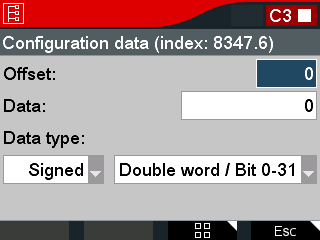
Parameters | Meaning |
|---|---|
Offset | Input of the offset Range of values: 0 – 255 |
Data | Enter the data at the set offset. The representation of the data is defined by the data type. Confirm the entry with the <OK> key to write the parameter to the inverter. |
Data type | Drop-down list 1:
Drop-down list 2:
|
