Transferring parameters from the inverter to the keypad
- The CBG21A keypad is connected to the inverter.
- Select the Data management icon from the main menu.
- Confirm with the <OK> key.
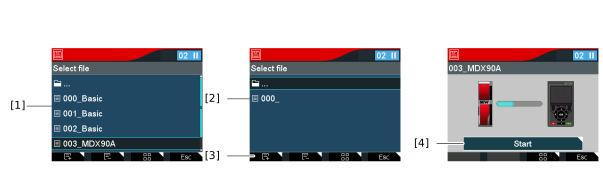
- Select the entry Inverter -> keypad [1].
- Confirm with the <OK> key.
- Select the file [2] in which the inverter parameters are to be saved.
- To create a new file, press the Add file function key [3].
- To delete the selected file, press the 2nd function key Delete file.
- INFORMATION You can change the file name on the computer when you save the data.
- Confirm with the <OK> key.
- Press the <OK> key.
- The data is written to the empty file.
- The parameters are loaded from the inverter to the keypad. The green check mark indicates that the data has been saved successfully.