Without electronic nameplate
Proceed as follows:
- Select the Startup icon in the main menu and press the <OK> key.
- Startup is being prepared: The data of the last startup is read by the inverter.
- Select the drive train and press the 2nd function key.
- Select the option "Without electronic nameplate" and press the 2nd function key.
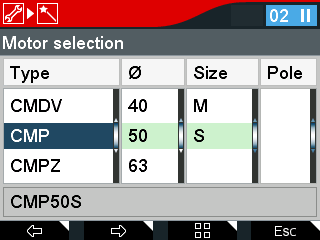
- All available SEW motors from the catalog integrated in the CBG21A are displayed.
- Select the motor:
- Select the type using the <up/down> keys.
- Press the <right> key and select the diameter using the <up/down> keys.
- Press the <right> key and use the <up/down> keys to select the size.
- Press the <right> key and use the <up/down> keys to select the poles.
- Follow the wizard and enter the corresponding data.
- The following query appears: "Do you want to activate startup and finish motor startup? WARNING: The drive might then start automatically."
- Confirm with the <OK> key.
- The data is calculated.
- The data is transferred to the inverter.

- The motor is ready for operation.
