Process data
To display the process data, press the Connect button on the Gateway tab in the device selection menu. 8 tabs are always displayed, regardless of how many inverters are connected. Each tab represents an inverter that can be connected to the MOVITRAC® gateway.
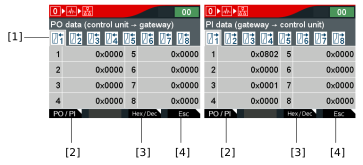

[1] | Tabs of the process data of the inverters |
[2] | To switch between the process input data and the process output data, press the 1st function key <PO/PI>. |
[3] | To switch between decimal and hexadecimal view, press the 3rd function key <Hex/Dec>. |
[4] | To return to the device selection, press the 4th function key <Esc>. |
