Device structure
The following figure shows the CBG21A keypad:
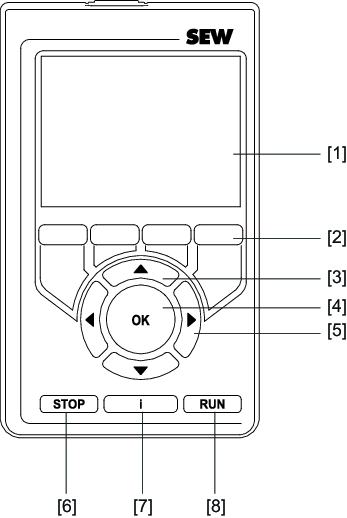

[1] | Color display |
[2] | 4 function keys that are assigned according to the context. The assigned functions are shown in the color display above the keys. |
[3] | <up/down> arrow keys: Navigating the menu and entering values. |
[4] | <OK> key: Confirming selections, values, and functions. |
[5] | <left/right> arrow keys: Navigating the menu and entering values. |
[6] | <STOP> key: Stopping the manual mode. |
[7] | <i> key: Displaying information about the current menu and screenshot function. |
[8] | <RUN> key: Starting the manual mode. |
