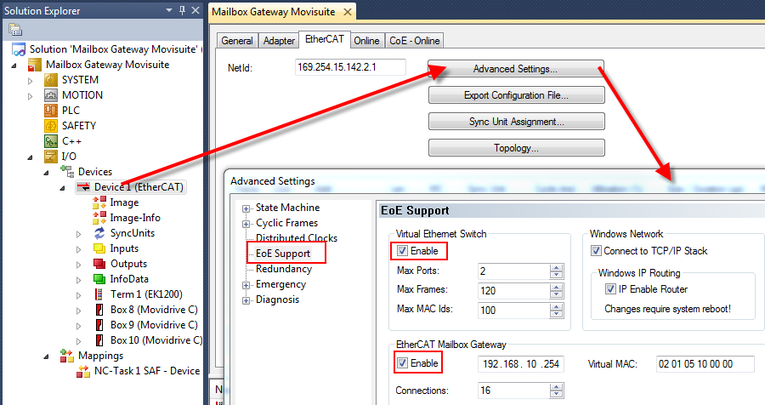
Configuring mailbox gateway
The mailbox gateway is configured in the engineering tool of the EtherCAT® master (TwinCAT 3).
Avoid the following when assigning IP addresses:
- the address range 169.x.x.x. This address range is often used by Windows as an emergency address range.
- Widely spaced address ranges
These address settings have been utilized for the following description:
Example:
Interface | IP address | Subnet mask | Standard gateway |
|---|---|---|---|
Engineering interface of the EtherCAT® master | 192.168.20.2 | 255.255.255.0 | Optional |
Mailbox gateway | 192.168.10.254 | 255.255.255.0 | Optional |
Engineering PC | 192.168.20.10 | 255.255.255.0 | Optional |
Proceed as follows:
- A project with I/O configuration has already been created (see Integrating the inverter into an EtherCAT® network).
- When the EtherCAT® master is located in the "RUN" operating mode, then activate the "Configuration" operating mode. To do so, click on the corresponding icon in the toolbar.
- Select the "Advanced Settings" of the EtherCAT® master and activate the EoE support.
- Enter the IP address of the mailbox gateway.
- Transfer the changed configuration to the EtherCAT® master and start the TwinCAT program. To do this, activate the "RUN" operating mode.
INFORMATION

When the mailbox gateway function should be utilized in parallel with several EtherCAT® masters, then a separate unique IP address must be assigned for each mailbox gateway in the same subnetwork.