Setting the interpolation time
To prevent interpolation errors that lead to losses in control performance, the interpolation time in the PLC and in the inverter must match.
The interpolation time can be adjusted in the inverter:
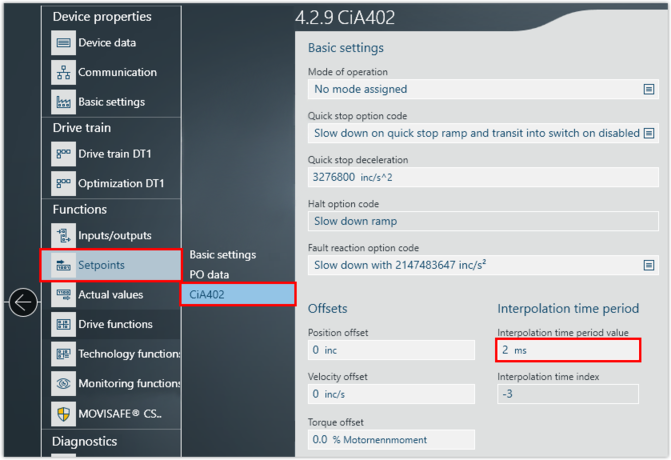
- in the MOVISUITE® engineering software
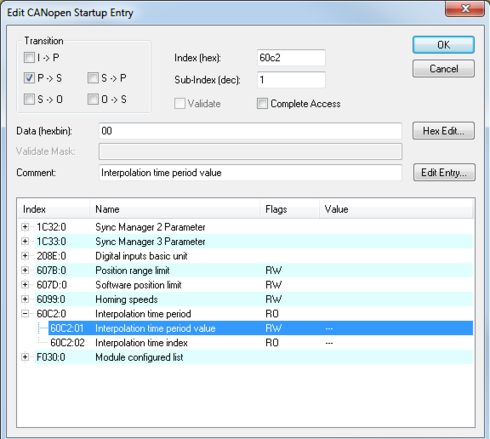
- during the startup phase of the EtherCAT® master into the startup list via the service
CoE (SdO)
Proceed as follows:
- You have mapped the EtherCAT® network in a TwinCAT project.
- You have integrated the inverter into a MOVISUITE® project.
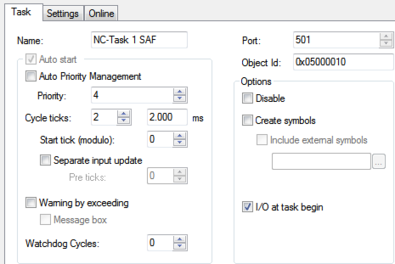
- In the project management, right-click to open the shortcut menu of the "NC Task. SAF" entry in the "MOTION" area. SAF..*
- Set the interpolation time of the EtherCAT® master in the "Task" tab. The default setting is 2 ms.
- If you want to enter the interpolation time of the inverter in the startup list of the EtherCAT® master, select the "Startup" tab.
- Click the [New] button.
- A window with settings regarding the startup behavior is displayed.
- Enter the interpolation time in ms.
- If you want to enter the interpolation time of the inverter in the MOVISUITE® engineering software, switch to the MOVISUITE® project.
- Open the configuration of the inverter and set the interpolation time. Make sure that you set the same value for the inverter as for the EtherCAT® master in the TwinCAT project. If you change the interpolation time in the EtherCAT® master, you must also change the interpolation time in the inverter.