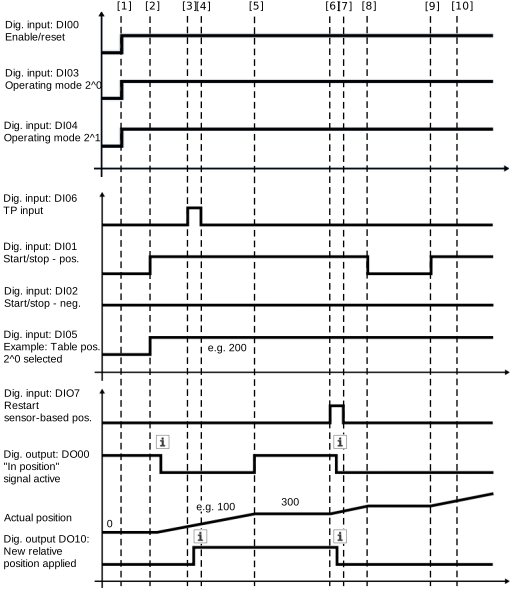
Positioning mode: Sensor-based positioning
If the additional mode "sensor-based positioning" is selected in "relative" positioning mode, the drive is initially moved in the same way as in jog mode. As soon as the trigger event is applied to the touchprobe sensor, the drive is moved relative to the current position. The relative position is interpreted with a sign according to the signals "Start/stop – positive" or "Start/stop – negative". A negative table position will cause the drive to reverse.
Sensor-based positioning is restarted via the "Restart sensor-based positioning" signal. This signal is effective at all times, i.e. an already active sensor-based positioning after detection of a touchprobe event is aborted, provided the drive is not already in the target position.
For activation, use the following Module configuration:
Operating mode | Positioning mode |
Positioning mode | 3: Relative |
Additional mode | 1: Sensor-based positioning |
Use fixed pitch? | No |
Configuration
In the "sensor-based positioning" additional mode, the DI 06 digital input is used as a touchprobe input. After activating the touchprobe function in the configuration of the software module, the following settings must be implemented manually in the Touchprobe 1 configuration menu:
- Data source (index 8352.30): Actual position in user units
- Trigger source (index 8352.10): Hardware input DI 06