Configuring the process data interface
Proceed as follows:
- You have integrated the controller into the PROFINET network.
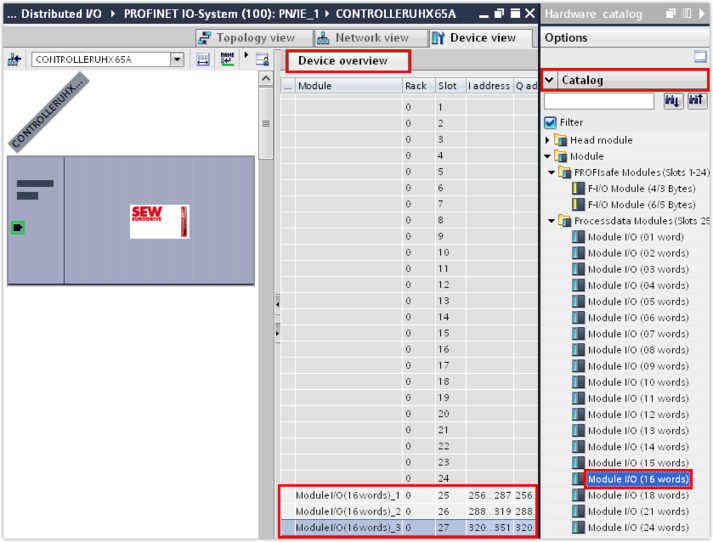
- Use drag and drop to insert the process data modules from the hardware catalog with the desired number of process data words into the device overview. Insert the process data modules in the order in which the MOVIKIT® software modules are assigned to the subordinate inverters. Note that the number of process data words required depends on the MOVIKIT® software module used (see Starting up the MOVIKIT® software module).
- The first slots are reserved for PROFIsafe. The number of reserved slots depends on the controller used.

Controller | Reserved slots |
|---|---|
MOVI‑C® CONTROLLER standard UHX25A‑N | 8 |
MOVI‑C® CONTROLLER advanced UHX45A‑N | 16 |
MOVI‑C® CONTROLLER progressive UHX65A‑R | 24 |
MOVI-C® CONTROLLER power UHX85‑R | 8 (Firmware V2.0, release 201703..) |
24 (newer firmware) | |
MOVI‑C® FIELD CONTROLLER | 8 |
MOVI‑C® FIELD CONTROLLER | 16 |
- Instead, you can add the process data words by double-clicking the process data module. They will be inserted at the permitted slot automatically.
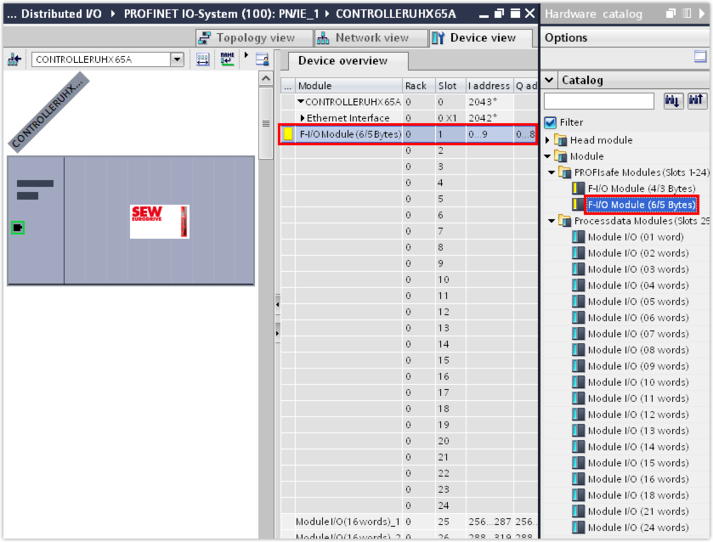
- From the hardware catalog, insert the process data words of each safe communication node into the device overview for the first reserved slots using drag and drop.
- In this example, the process data words of the MDA90A single-axis module with integrated MOVISAFE® CSS21A safety card (6/5 bytes) are made available for safe communication on the first slot. The assignment of the appropriate PROFIsafe module to the respective safety card can be found in chapter Device description file of MOVISAFE® CS..A safety options.
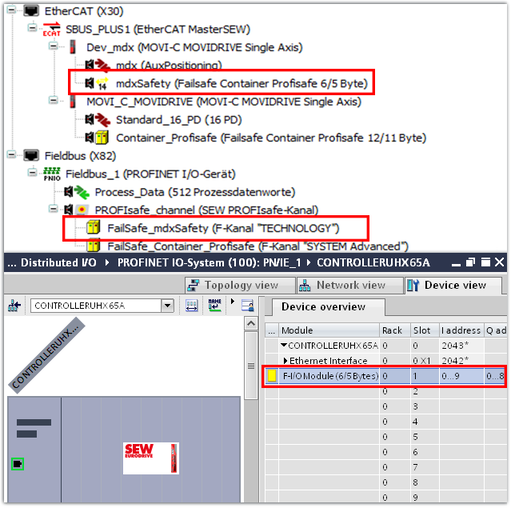
- The slots for safe communication are assigned linearly and without gaps to the real safety cards. The real safety cards are mapped in the IEC Editor and referenced by their designation to what are called the failsafe containers. The failsafe containers are referenced to the slots for safe communication in the TIA Portal via their position. The following example shows the assignment of the safety card in the IEC project to the slots for safe communication in the TIA Portal:
Engineering tool | Entry/slot | Explanation |
|---|---|---|
IEC Editor (Integrated in the MOVISUITE® engineering software) |
Safety card in the inverter | The inverter is the first inverter in the axis system. |
Failsafe container | The failsafe container is at the first position in the PROFIsafe fieldbus object corresponding to position 1 of the inverter (the safety card) in the axis system. | |
TIA Portal (Engineering tool of the PLC) | Slot for safe communication | The first slot for safe communication in the device overview corresponds to the first failsafe container in the PROFIsafe fieldbus object. |
If an axis system also contains stations without integrated safety cards, these stations are simply not taken into account when assigning the slots.
INFORMATION