Starting up the MOVIKIT® software module
The MOVIKIT® Velocity software module from the "SingleAxis" category is used for this example. MOVIKIT® Velocity provides a standardized functionality and interface for a typical speed-controlled drive.
INFORMATION

For more detailed information on MOVIKIT® software modules, refer to the corresponding documentation.
Proceed as follows:
- You have integrated the devices of the MOVI-C® modular automation system in a MOVISUITE® project and configured the drive train.
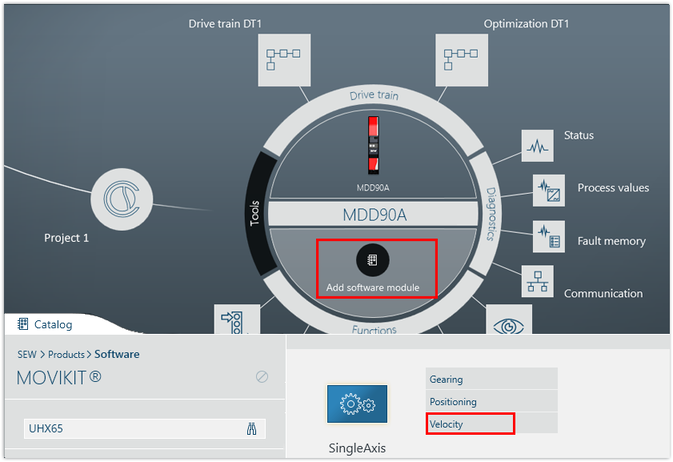
- Click [Add software module] in the circle view of the inverter and select "Velocity" from the catalog in the "SingleAxis" category. Accept the suggested version of the software module.
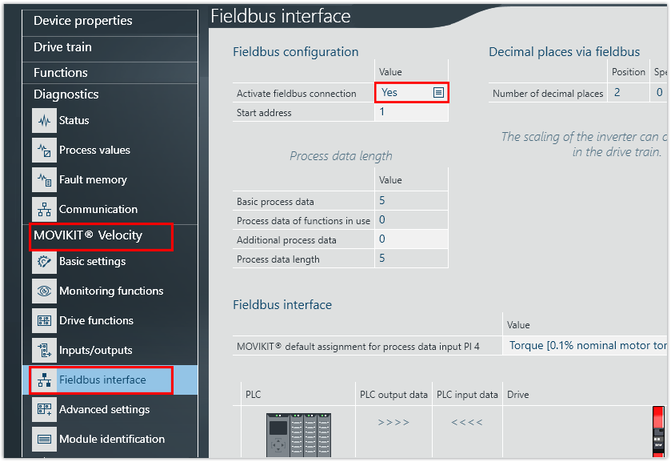
- Open the configuration of the inverter and activate the fieldbus connection of the software module in the [MOVIKIT® Velocity] > [Fieldbus interface] parameter group.
- Configure the start address and the process data length.
- The start address of the first inverter is 1. If you have subordinated several inverters to a MOVI-C® CONTROLLER, the start address of the following inverters is shifted by the total length of the preceding process data.
- The different MOVIKIT® software modules have different process data lengths. For example, MOVIKIT® Velocity has 5 process data words and MOVIKIT® Positioning has 8 process data words.
- The following example shows the dependence of the start addresses on the number of process data words in a device topology with 3 subordinate inverters:

Device | Assigned software module | Start address |
|---|---|---|
Inverter 1 | MOVIKIT® Velocity (5 PD) | 1 |
Inverter 2 | MOVIKIT® Positioning (8 PD) | 6 (= 1 + 5 from inverter 1) |
Inverter 3 | MOVIKIT® Velocity (5 PD) | 14 (= 1 + 5 from inverter 1 + 8 from inverter 2) |
INFORMATION
