EtherCAT®: Integrating an inverter by scanning the network
Proceed as follows:
- Start the TwinCAT 3 engineering tool and create a new TwinCAT project.
- Set the EtherCAT® master to the configuration state ("Configuration" operating mode). To do so, click the "gear wheel" icon in the toolbar.
- As soon as the master is in the configuration state, the "gear wheel" icon is displayed at the bottom right corner of the window.
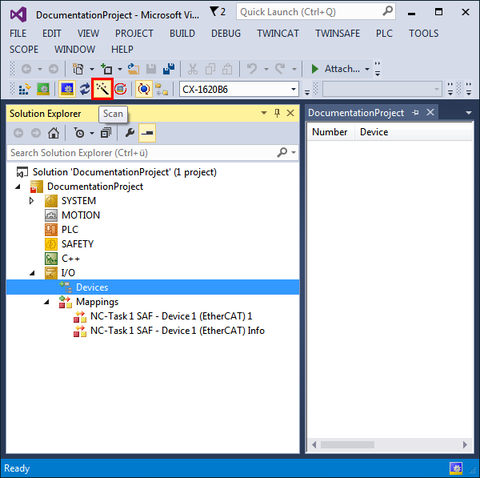
- To scan the network, select the "Devices" entry in the "I/O" area of the project management and click the "magic wand" icon in the toolbar.
- All available interfaces of the master are displayed.
- If necessary, deactivate all unused interfaces and confirm the "Scan for Boxes" query.
- The system only searches for devices on the interfaces that are still active.
- Transfer the detected inverters to the I/O configuration.