Connecting the engineering PC and MOVI‑C® FIELD CONTROLLER
To ensure that the engineering PC can communicate via the X4224 engineering interface with the MOVI‑C® FIELD CONTROLLER via Ethernet, both the devices must be connected in the same local network. For this purpose, the IP address parameters of the engineering PC must be set to the local network. The default IP address(es) of the Ethernet communication interface(s) can be found in chapter DIP switch S3.
Proceed as follows:
- Open the settings for the network via the Windows control panel.
- Double-click on the adapter that is physically connected to the X4224 engineering interface of the MOVI‑C® FIELD CONTROLLER.
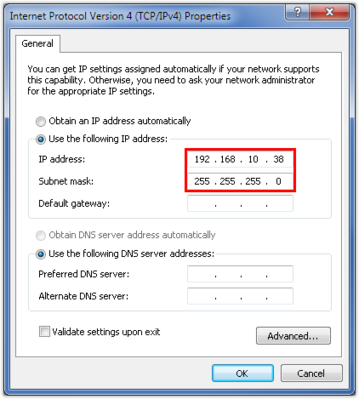
- Select the Internet protocol version 4 "TCP/IPv4" in the adapter properties.
- Enter the IP address parameters of the engineering PC in the Internet protocol properties. Note that the IP address of the engineering PC is different from the IP address of all other network stations and is therefore unique. The network address (in this case, the first 3‑address blocks) for all network stations must be identical and the station address (in this case, the last address block) of the engineering PC must be different from the network address of all other stations.
- In this example, the IP address of the engineering PC is: 192.168.10.38