Interface adapter USM21A
With the interface adapter USM21A, it is possible to connect an engineering PC with a USB interface to the diagnostic slot of a device from SEW‑EURODRIVE. The connection is made with a device-specific connection cable. Refer to chapter Available connection cables for information on which cable you need for your device. The connection to the engineering PC and the power supply is made via a USB type B socket. The data is transferred according to the USB 2.0 standard. Operation on a USB 3.0 device is also possible. The matching connection cable is included in the delivery.
The adapter communicates with the device via RJ10 socket. Depending on the supported interface standard of the diagnostic interface, the interface adapter is connected to the RS485 interface or the system bus interface (CAN bus) of the device. The version and baud rate of the interface used is defined in the MOVITOOLS® MotionStudio engineering software, in MOVISUITE® standard or LT Shell depending on the device type and the requirements. For more information, refer to chapter Available connection cables.
The interface converter and the device communicate only point-to-point, and the termination of the RS485 and the CAN bus is permanently installed.
The interface adapter is equipped with a status display for the bus and an error display.
The following figure shows the interface adapter, its connections and displays.
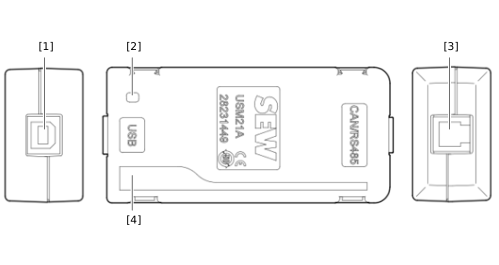

[1] | USB socket type B |
[2] | |
[3] | RJ10 socket |
[4] |
