Assigning PROFINET device names (optional)
INFORMATION

If you want to use the PROFINET device name of the controller that you have already assigned in MOVISUITE®, you can skip the following steps.
Data (PROFINET device name, IP address, safe process data) that have been assigned to the fieldbus stations during configuration are first only defined in the TIA Portal project on the engineering PC. The data is transferred to the PLC and activated only when the project is loaded to the PLC.
Proceed as follows:
- You have configured the controller.
- Load the project to the PLC using the programming interface used.
- Select the found PLC and add it to the TIA Portal project.
- The project view is displayed again.
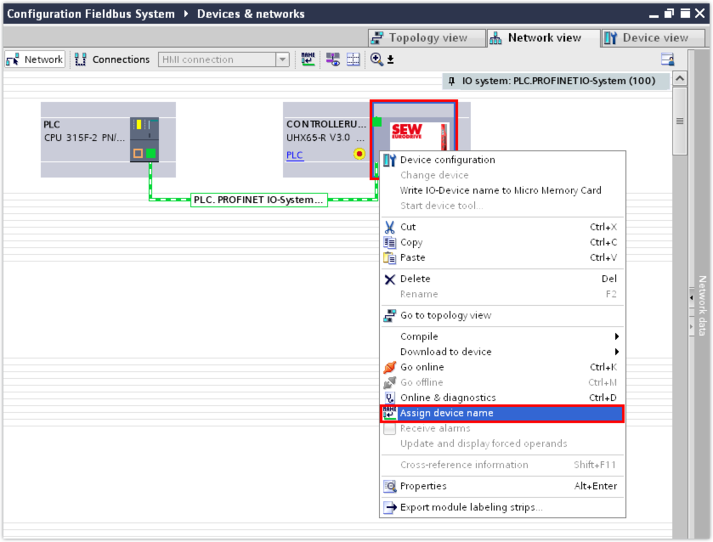
- If the status LED L41 or BF of the controller lights up red (bus error) after having transferred the TIA Portal project to the PLC, then you have to assign the specified PROFINET device name to the controller. To do so, right-click to open the shortcut menu of the controller and assign the device name.
- A window with settings for assigning a name is displayed.
- Select the PROFINET device name of the controller.
- Set the used programming interface of the controller and refresh the list of stations.
- Select the controller and assign a device name. This overwrites the suggested name of the device description file ().
- Once you have successfully assigned the PROFINET device name, the controller returns the status "OK". The status LED L41 or BF goes out.
- Save the TIA Portal project.