Integrating controllers in the PROFINET network in TIA Portal
The controller must be added to the TIA Portal project, connected to the PLC, and configured.
During configuration, the controller is assigned a logical name, an IP address, and process data with addresses.
If the control is realized via PROFIsafe for an inverter with integrated safety card, a safe communication channel between the PLC and the controller must also be configured.
INFORMATION

This example describes the procedure for a configured and approved MOVISAFE® CSS21A safety card. Configuration of the safety card is described in the "MOVIDRIVE® modular, MOVIDRIVE® system MOVISAFE® CS..A safety card" manual.
Proceed as follows:
- You have already downloaded the device description file () of the controller from the SEW‑EURODRIVE homepage (www.sew-eurodrive.com) and saved it locally on the engineering PC.
- Start the TIA Portal and create a new TIA Portal project.
- Install the device description file in the TIA Portal.
- Add the PLC to the project. Assign a PROFINET device name and enter the IP address parameters of the PLC.
- Insert the IO system at the PROFINET interface of the PLC.
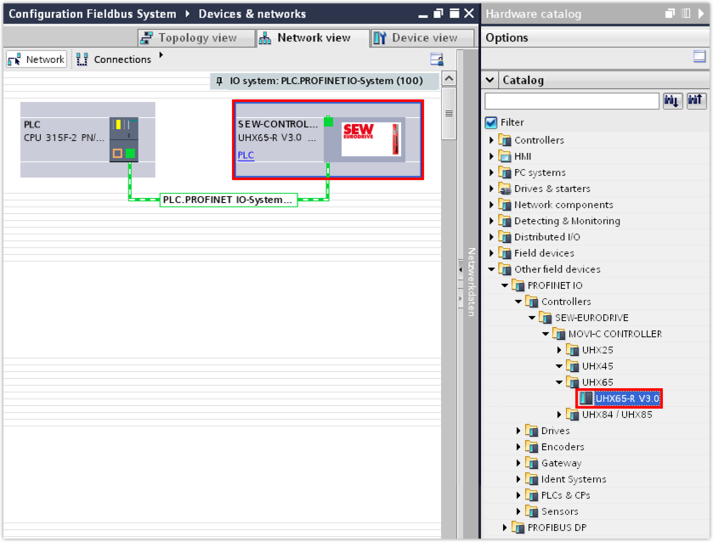
- Open the hardware catalog. Under [More field devices] > [PROFINET IO] > [Controllers] > [SEW-EURODRIVE] > [MOVI-C CONTROLLER] > [UHX65A ], select the entry for the MOVI‑C® CONTROLLER progressive UHX65A‑R and assign this entry in the network view of the PLC.
- In the inspector window (lower editor section), enter the IP address parameters of the controller in the "Ethernet addresses" section.
- Assign a PROFINET device name to the controller. Make sure that the PROFINET device name is identical to the device designation in the MOVISUITE® project.
INFORMATION
If several controllers are displayed in the hardware catalog, the version of the controller (version of the device description file) must match the firmware version of the fieldbus card. Check the firmware version of the fieldbus card in MOVISUITE® in the configuration of the controller in the "Firmware 1 - Version" parameter ([Device properties] > [Device data] > [Subcomponent] parameter group).