Checking the standard communication
Watch tables allow for monitoring and controlling the process data exchange.
Proceed as follows:
- Establish an online connection between the engineering PC and the PLC.
- Add a new watch table in the "Watch and force tables" subfolder of the PLC.
- Enter the addresses of the process data words in the "address" column. The input addresses and output addresses define which process data word is used to address a station.
- Enter test values for some process output data words in the "Modify value" column. The values are sent to the controller if communication has been established successfully.
- Start observing and controlling the active variables.
- The set test values of the process output data words are transferred to the "Monitor value" column. The PLC sent the test values to the controller.
- Switch to the IEC Editor project.
- Double click the process data of the PROFINET device in the device tree and check if the values of the process input data words of the controller are identical to the sent test values.
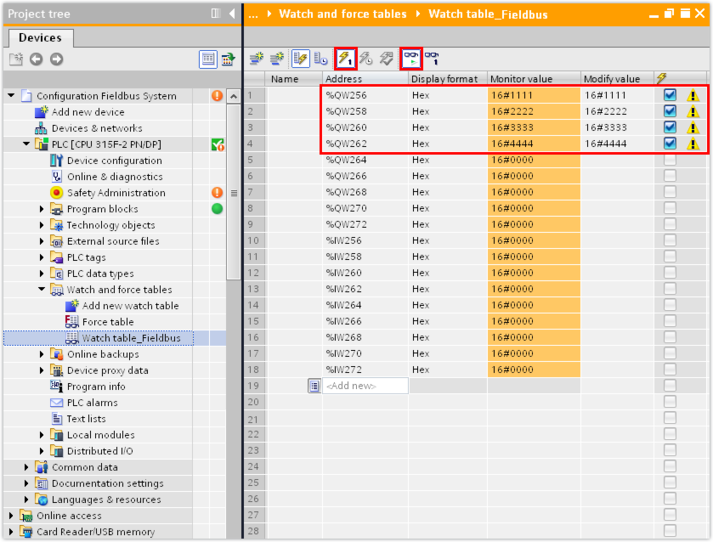

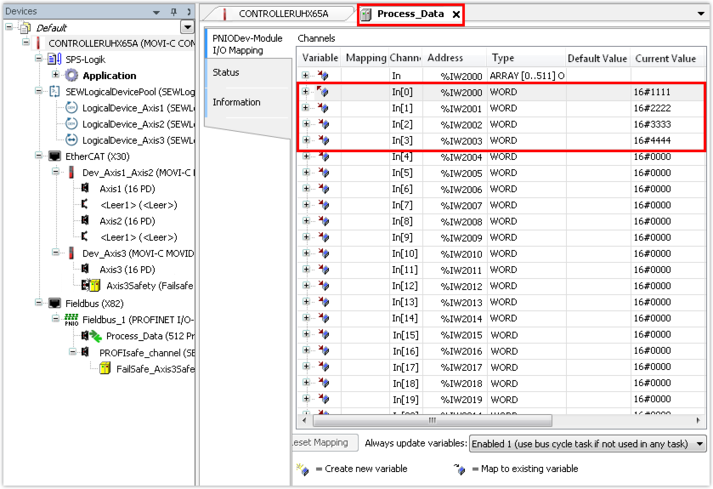
- If the test values sent by the PLC have arrived at the controller, the communication has been established successfully.
- Alternatively, you can use the fieldbus monitor in the IEC Editor (see Performing fieldbus diagnostics in the IEC Editor).
