Checking safe communication
INFORMATION

The safety program in this example only serves to explain the test run of drive safety functions and is not part of a safety program specified by SEW-EURODRIVE.
The safe process data cannot be controlled directly. This is why a safety program with the following functions must be created:
- Re-integrating the safe communication node that has been passivated by the drive safety functions in the safe communication after fault acknowledgment.
- Deactivating drive safety functions. Only in deactivated safety operation are some troubleshooting measures of the safety program are switched off to enable data of the safety program to be changed via watch tables.
Proceed as follows:
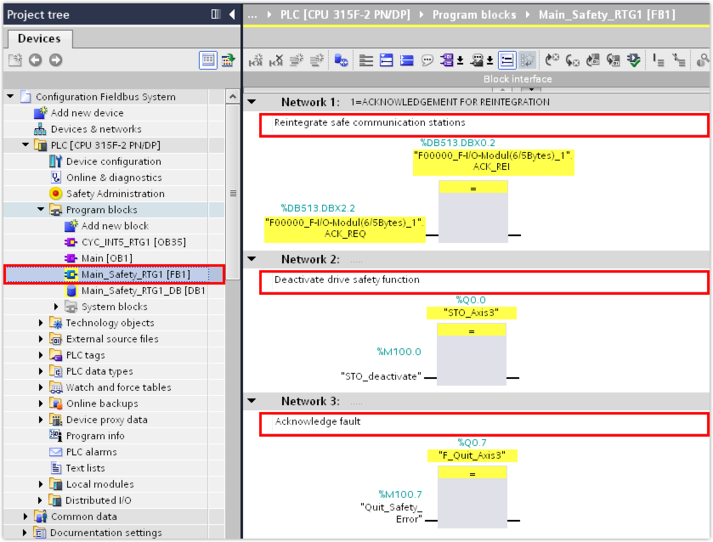
- In the TIA Portal project, select the main safety block
Main_Safety_RTG1 [FB1]. - Add the F-module with the following access functions to the safe communication node:
- Re-integrate the safe communication node: Use the variables
ACK_REQ(acknowledgment required for reintegration) andACK_REI(acknowledgment for reintegration) from the F‑periphery database. - Deactivate the drive safety function: Assign a flag to the corresponding safe process output data word. A safe process output data word cannot be directly addressed. This is why the safe process output data word is switched by a flag (memory area to store temporary results).
- Acknowledge fault: Assign a flag to the corresponding safe process output data word.
- In the example, flags are assigned to the safe process output data 0.0 (drive safety function STO) and 0.7 (fault acknowledgment).
- Compile the TIA Portal project and load the project to the PLC.
- Establish an online connection between the PLC and the controller.
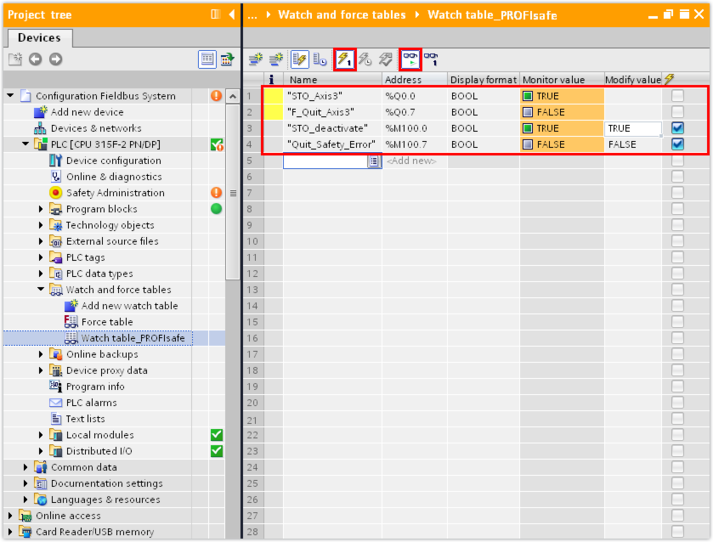
- Add a new watch table in the "Watch and force tables" subfolder of the PLC.
- Add the safe process output data words referenced in the safety program and the assigned flags to the watch table.
- The drive is stopped by the drive safety function STO and the safe communication node is passivated.
- Acknowledge the fault by setting the control word of the assigned flag to 1.
- Start observing and controlling the active variables.
- The safe communication node is re-integrated in the safe communication and the PLC sends process data to the safe digital output of the communication node.
- Switch to the MOVISUITE® project and open the configuration of the safe communication node.
- In the diagnostics information of the safety protocol, check if the safety telegram (F-telegram) receives data.

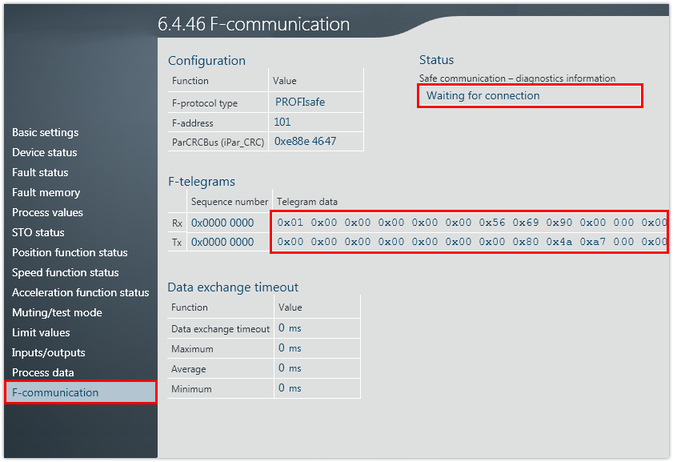
- If telegram data is received by the safe communication node, safe communication is established successfully.
