Startup procedure

WARNING

Electric shock caused by dangerous voltages in the connection box. Dangerous voltages may still be present for up to 1 minute after disconnection from the power supply.
Severe or fatal injuries.
- De-energize the unit using a suitable disconnection device.
- Protect it against unintentional reconnection to the voltage supply.
- Wait for at least 1 minute before disassembling the device.
- Remove the MOVIMOT® inverter from the connection box.
- Check whether the MOVIMOT® drive is installed correctly both mechanically and electrically.
- Refer to chapters "Mechanical Installation" and "Electrical Installation".
- Set the correct RS485 address of the drive at DIP switches S1/1 – S1/4.
- In conjunction with fieldbus interfaces MF../MQ., always set address "1".
Decimal address | 0 | 1 | 2 | 3 | 4 | 5 | 6 | 7 | 8 | 9 | 10 | 11 | 12 | 13 | 14 | 15 |
|---|---|---|---|---|---|---|---|---|---|---|---|---|---|---|---|---|
S1/1 | – | X | – | X | – | X | – | X | – | X | – | X | – | X | – | X |
S1/2 | – | – | X | X | – | – | X | X | – | – | X | X | – | – | X | X |
S1/3 | – | – | – | – | X | X | X | X | – | – | – | – | X | X | X | X |
S1/4 | – | – | – | – | – | – | – | – | X | X | X | X | X | X | X | X |
X | = ON | – | = OFF |
- Set the minimum frequency fmin using the switch f2.


f2 switch: | ||||||||||||
|---|---|---|---|---|---|---|---|---|---|---|---|---|
Detent position |
| 0 | 1 | 2 | 3 | 4 | 5 | 6 | 7 | 8 | 9 | 10 |
Minimum frequency fmin [Hz] | 2 | 5 | 7 | 10 | 12 | 15 | 20 | 25 | 30 | 35 | 40 | |
- If the ramp time is not specified via the fieldbus, set the ramp time at switch t1.
- The ramp time is based on a setpoint step change of 1500 min-1 (50 Hz).

t1 switch: | ||||||||||||
|---|---|---|---|---|---|---|---|---|---|---|---|---|
Detent position |
| 0 | 1 | 2 | 3 | 4 | 5 | 6 | 7 | 8 | 9 | 10 |
Ramp time t1 [s] | 0.1 | 0.2 | 0.3 | 0.5 | 0.7 | 1 | 2 | 3 | 5 | 7 | 10 | |
- Check to see if the required direction of rotation has been enabled.
CW/stop | CCW/stop | Meaning |
|---|---|---|
Activated | Activated |
|
| ||
Activated | Not activated |
|
| ||
Not activated | Activated |
|
| ||
Not activated | Not activated |
|
| ||




- Place the MOVIMOT® inverter onto the connection box and screw it in place.
- Set the maximum speed required using setpoint potentiometer f1.
- Make sure the screw plug of the setpoint potentiometer has a seal and screw it in.
- Switch on the DC 24 V control voltage and the line voltage.
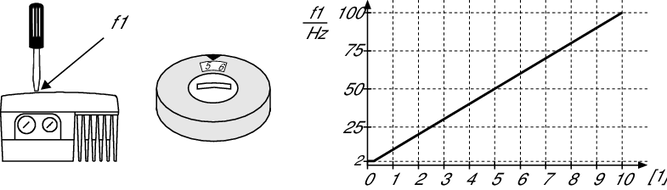
[1] | Potentiometer setting |
For further information on the function in conjunction with the RS485 master, refer to chapter Function with RS485 master.
For information on the function in connection with fieldbus interfaces, refer to the corresponding fieldbus manuals.
