Example
Fine adjustment of setpoint f2 using MOVITOOLS® MotionStudio
- Perform "Easy" startup using switch f2 for rough adjustment, e.g. setting 5 (25 Hz = 750 min-1).
- Connect the PC/laptop to the MOVIMOT® inverter.
- Connect the 24 V supply of the MOVIMOT® inverter.
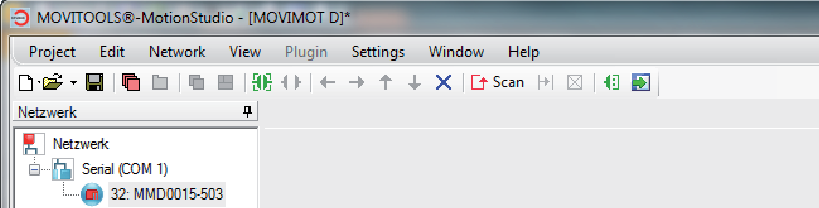
- Start MOVITOOLS® MotionStudio.
- Create a project and a network.
- Configure the communication channel on the PC/laptop.
- Perform an online scan.
- Open the context menu by clicking the right mouse button and select the menu item "Startup" > "Parameter tree".
- Set parameter P805 Startup mode to "Expert".
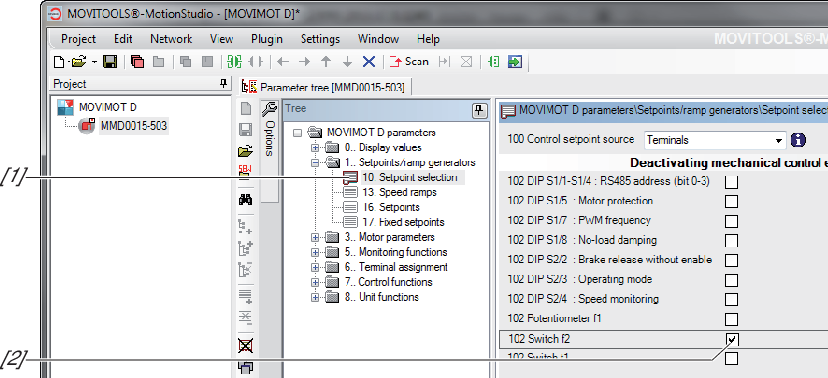
- Open the "Setpoint preselection" folder [1].
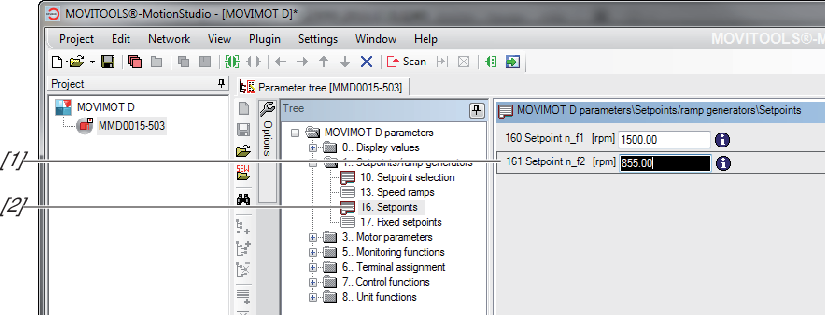
Deactivate switch f2 by setting the check box of parameter P102 Deactivating mechanical controls [2] (parameter P102:14 = "1" => P102 = "0100 0000 0000 0000"). - Open the "Setpoints" folder [2].
Adjust parameter P161 setpoint n_f2 [1] until the application runs optimally,
e.g. parameter P161 = 855 min-1 (= 28.5 Hz) - Disconnect the PC/laptop from the MOVIMOT® inverter.
- Reinstall the screw plug of the setpoint potentiometer with the seal.