Activation

WARNING

Risk of crushing if the drive starts up unintentionally.
When deactivating the manual mode, the binary signals (binary control) or the process data of the master (control via RS485) become active. If the enable signal is present via the binary signals or process data, the MOVIMOT® drive can start up unintentionally when deactivating manual operation.
- Before deactivating the manual mode, set the binary signals or the process data in such way that the MOVIMOT® drive is not enabled.
- The binary signals or process data must only be changed again after deactivating manual operation.
To switch to manual mode, proceed as follows:
- Use the
 key to switch to the context menu.
 - Use the
 or
or  key to select "MANUAL MODE".
 - Press the
 key to confirm your selection.
The keypad is now in manual mode.
INFORMATION

If the drive is enabled or the brake is released, you cannot switch to manual mode.
The display shows the message "NOTE 17: INV. ENABLED" for 2 seconds. The operator terminal switches to the context menu.
Display in manual mode
|
Display alternates every 2 s |
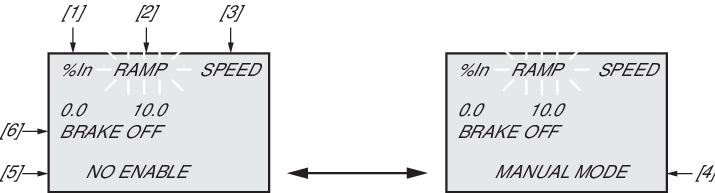
[1] | Output current in % of IN. |
[2] | Acceleration (speed ramps in [s] in relation to setpoint step change of 50 Hz) |
[3] | Speed in min-1 |
[4] | Display in manual mode |
[5] | Inverter status |
[6] | Brake status |
