Configuring MOVISAFE® CS..A safety card
If control is realized via FSoE for a device with integrated safety card, the safe communication channel must be configured.
INFORMATION

This example describes the procedure for a configured and approved MOVISAFE® CSS21A safety option. The configuration of a safety option is described in the manual of the respective safety option.
MOVISUITE® provides the following functions for safety cards:
- Starting up safety-related drive safety functions
- Reading and partially writing safety-related F‑parameters, such as F_iPar_CRC, F_WD_Time, etc.
- Diagnostics of safe communication by monitoring F process data
- Diagnostics of the FSoE slave (e.g. status messages and error messages)
Proceed as follows:
- You have already downloaded the device description file (ESI file) of the inverter from the SEW‑EURODRIVE homepage (www.sew-eurodrive.com) and saved it locally on the engineering PC.
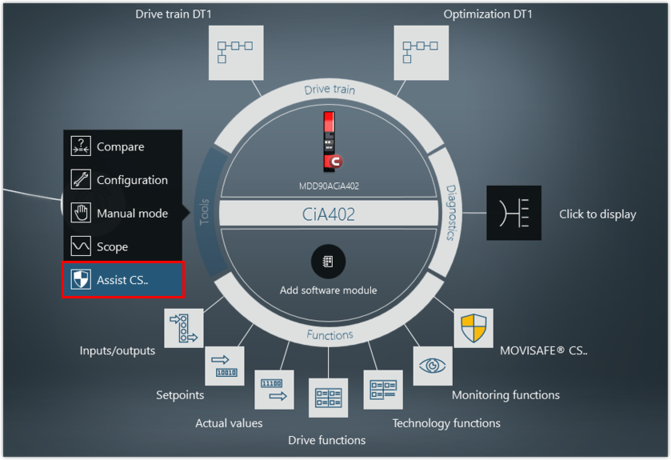
- Start the Assist CS.. tool
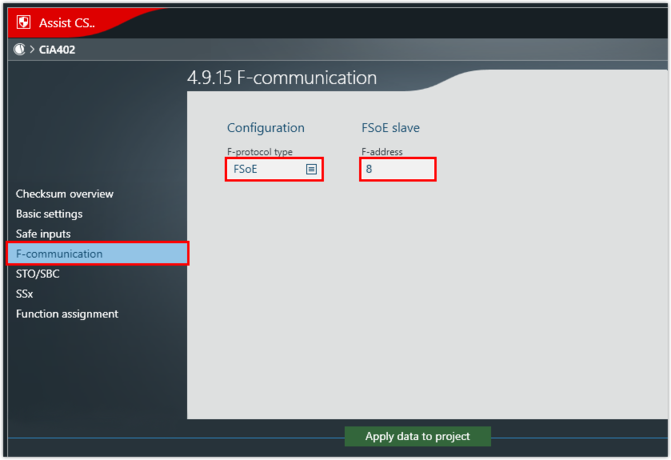
- Select the F‑protocol FSoE and enter the F‑address. The F-address is the unique address of the safe communication station within a safe network used for checking the authenticity of the connection. The address must have a value greater than 0.
- The F-address of the inverter (FSoE slave) must match the address in the FSoE master.
- Transfer the data from the Assist CS.. tool to the MOVISUITE® project.