Setting up RS485 communication
Proceed as follows:
- You have installed the required version of the engineering software on the engineering PC. For information on the required version, refer to Requirements.
- You have not started an engineering software on the engineering PC.
- Start MOVITOOLS® MotionStudio.
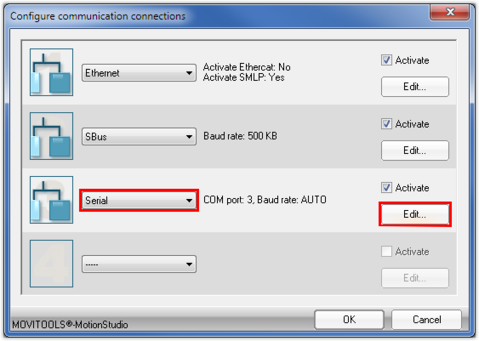
- To configure the communication connection, click [Configure communication connections] in the toolbar.

- This opens the "Configure communication connections" window.
- Select the "Serial" entry from the drop-down list of a communication connection that is not yet in use.
- Click the [Edit] button of the communication connection.
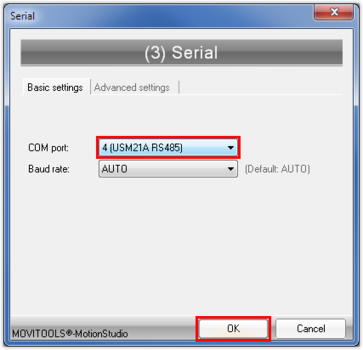
- The "Serial" window opens.
- In the "COM port" drop-down list, select the port of the engineering PC to which the interface adapter is connected.
- Click [OK].
- This opens the "Configure communication connections" window.
- Click [OK].
- Perform a network scan.