Operating displays for startup and operation on the PROFINET IO
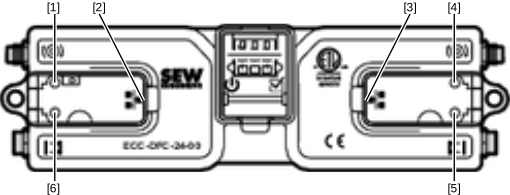

[1] | "Left motor" LED – motor status indicator |
[2] | RJ45 socket, left |
[3] | RJ45 socket, right |
[4] | "Right motor" LED – motor status indicator |
[5] | Right sensor status LED indicator |
[6] | Left sensor status LED indicator |
The 4 LEDs [1], [4], [5], [6] flash red at the same time when "Flash LED" is clicked in the engineering tool.
The LEDs "Activity" and "Link" are visible only in the top view of the RJ45 sockets [2], [3]:
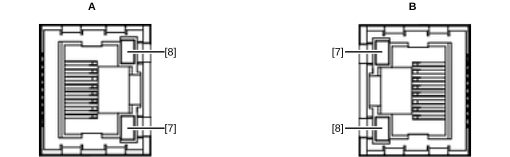
A | Top view, RJ45 socket [2] |
B | Top view, RJ45 socket [3] |
[7] | Link LED |
[8] | Activity LED |
LED | State | Meaning |
|---|---|---|
Link [7] | Green | Ethernet connection available. |
Link [7] | Off | No Ethernet connection available. |
Activity [8] | Yellow | Data transfer via Ethernet in progress. |
