Control in manual mode
Once manual mode has been successfully activated, you can control the MOVIMOT® drive using the controls in the "Manual mode" window of MOVITOOLS® MotionStudio.
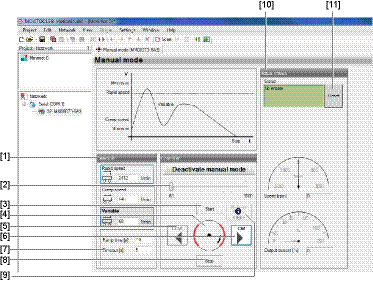

- Use the slider [2] in the "Control" group to set the variable setpoint speed.
- Use the buttons [clockwise] [6] or [counterclockwise] [5] to specify the direction of rotation..
- Click on the [Start] button [3] to enable the MOVIMOT® drive.
- The motor axis [4] shown in the "Control" group symbolizes the direction of rotation and the speed of the motor.
- Use the [Stop] [8] button to stop the drive.
Alternatively, you can enter the setpoints for rapid speed, creep speed or variable speed setpoint directly in the "Setpoints" group [1].
The direction of rotation is defined by the sign (positive = clockwise rotation, negative = counterclockwise rotation).
First enter the setpoint. Press <ENTER> and click on the button that contains the setpoint input field to enable the MOVIMOT® drive.
The group "Actual values" [10] displays the following actual values of the MOVIMOT® drive:
- MOVIMOT® inverter status
- Motor speed in min-1
- Output current of the MOVIMOT® inverter in [%] of IN
On MOVIMOT® drives with a brake, you can release the brake even without drive enable by activating the "Brake release" check box [9].
INFORMATION

The brake can only be released without drive enable if:
- DIP switch S2/2 = ON
- Or this function is enabled via parameter P738
