PC/laptop connection
MOVIMOT® drives are equipped with an X50 diagnostic interface (RJ10 connector) for startup, parameterization and service.
The diagnostic interface [1] is located underneath the screw plug on top of the MOVIMOT® inverter.
Before inserting the connector into the diagnostic interface, unscrew the screw plug.
If no screw plug is screwed into the diagnostic interface, you must ensure that no moisture and dust can penetrate the MOVIMOT® drive.
Wait for the MOVIMOT® drive to cool down sufficiently before touching it.
The diagnostic interface is connected to a commercially available PC/laptop with one of the following interface adapters [2] with a USB interface
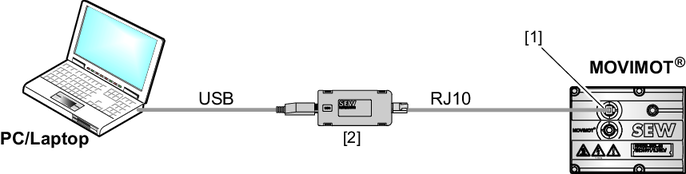

[1] | Diagnostic interface |
[2] | Interface adapter |
Scope of delivery:
- Interface adapter
- Cables with RJ10 connector
- USB interface cable
The following interface adapters are available:
Designation | Part number |
|---|---|
USM21A | 28231449 |
USB11A | 08248311 |
