v position ranges
The "v position ranges" function can be used to adjust the travel profile by specifying a position window as well as a corresponding speed, deceleration, and acceleration.
The travel parameters can be set individually for each v position range. This allows for applications with different dynamics parameters for loaded and empty travels, for example.
Application example
Careful handling of a load, as for example when the load handling device lifts a pallet. Activation of this function via the application control word should take place at standstill. If it is activated during travel, deceleration to speed "0" using FCB 26 takes place first before the travel profile is traveled. The travel profile is only traveled if the v position range is on the way to the target position, or if the target position is within the v position range.
Information: This function can only be activated in operating mode 400 (positioning absolute) for linear axes. If a v cam position with an invalid v cam window range is selected, the motor is stopped using FCB 26. Observe the following rule for defining v position ranges:
V left limit ≤ v right limit
If an invalid v position range is selected, it is ignored and the normal positioning process is performed. An active v cam travel process is reported back via the application status word.
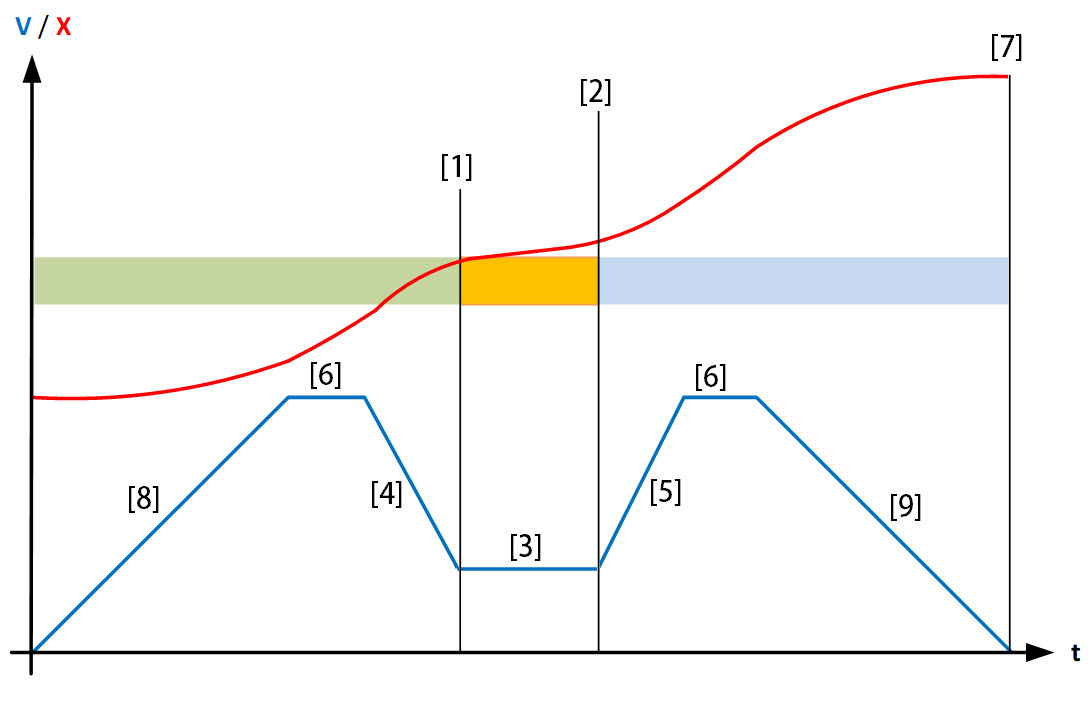

1 | Left limit |
2 | Right limit |
3 | Speed |
4 | Deceleration |
5 | Acceleration |
6 | Fixed setpoint: Table speed |
7 | Fixed setpoint: Table position |
8 | Fixed setpoint: Table acceleration |
9 | Fixed setpoint: Table deceleration |
