Structure of the menus
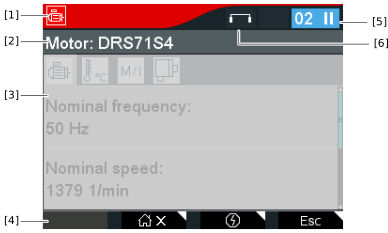

[1] | Status bar The icons of the main menu and submenu are displayed on the left. |
[2] | Headline |
[3] | Menu The functions are displayed here. |
[4] | Line with function keys The symbol indicates the meaning of the respective function key. |
[5] | Status display The status of the inverter is displayed on the right. |
[6] | Control mode Indicates whether direct or indirect control mode is active. For further information, refer to chapter Direct and indirect control mode. |
Additional information


