Transferring process data words to the controller
The process data exchange is monitored and controlled in Logix Designer with "Controller Tags".
Proceed as follows:
- You have loaded the MOVISUITE® project to the controller via the IEC Editor.
- The connection between the PLC and the controller is set up (the PLC is in RUN mode).
- Switch to the Logix Designer project.
- In the "Controller Organizer", select the "Controller Tags" area.
- The right-hand screen pane displays the process data words that the PLC exchanges with the controller.
- In this example, these process output data words are sent to the controller.
- Switch to the IEC Editor project.
- Double-click the process data of the EtherNet/IP™ slave in the device tree and check if the values of the process input data words of the controller are identical to the sent process output data words of the PLC.
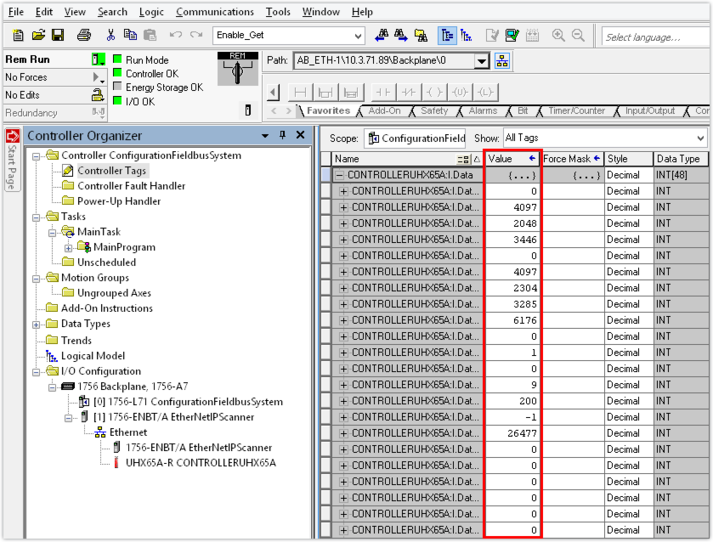

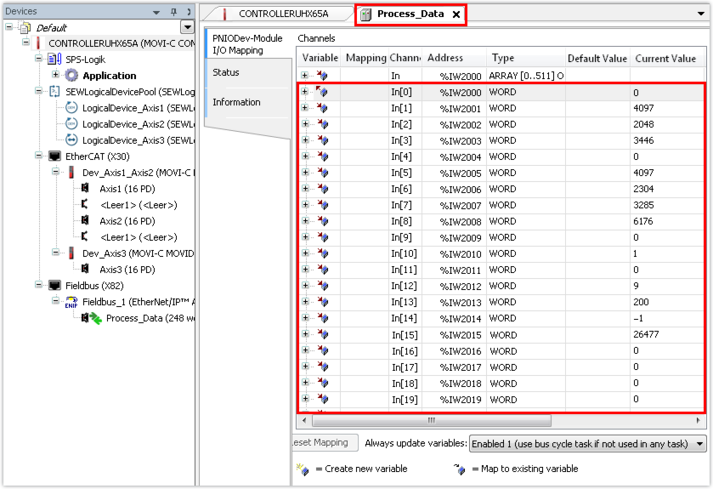
- If the process data words sent by the PLC have arrived at the controller, the communication has been established successfully.
- Instead, you can use the fieldbus monitor in the IEC Editor (see "Performing fieldbus diagnostics in the IEC Editor").
