Startup of "full PLC configuration"
In contrast to "standard configuration", the ECShell engineering software is not needed in "full PLC configuration", because all the settings are performed by the higher-level PLC.
To configure a node in "full PLC configuration" mode in the TIA Portal engineering tool, proceed as follows:
- Using drag and drop, drag the desired DAP [3] from the hardware catalog [2] to the PROFINET IO system [1].
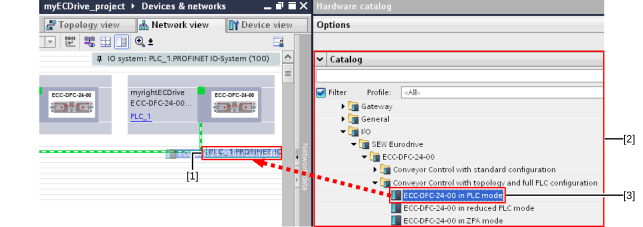

[1] | PROFINET IO system |
[2] | Hardware catalog |
[3] | DAP |
In contrast to "standard configuration", you can freely select the PROFINET device name and the IP address in accordance with the PROFINET guidelines.
Additional information