Creating an IEC project
INFORMATION

For detailed information on IEC project generation, refer to the "MOVISUITE® IEC project creation" manual.
If all components used, such as user units, safety cards, fieldbus, process data length and offset of the MOVIKIT® software modules, are configured in MOVISUITE®, a suitable, executable IEC project is created during code generation. In this IEC project, you can access the functionalities of the MOVIKIT® software module and the safety card without further IEC programming.
Proceed as follows:
- You have configured the components used in MOVISUITE®.
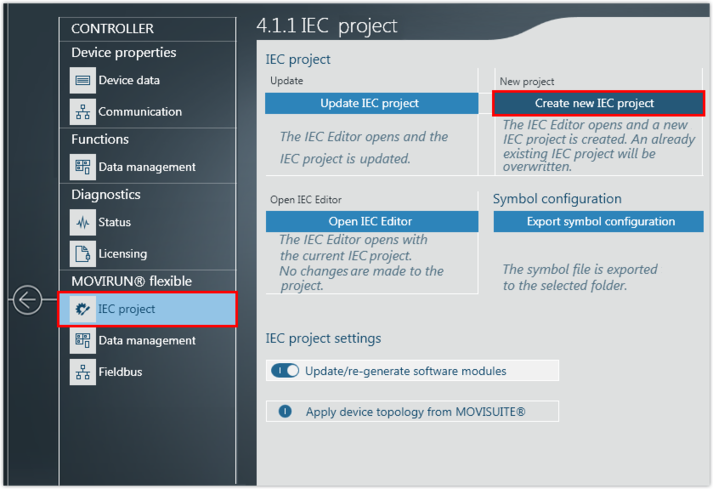
- Start the IEC Editor with a newly generated (or existing) project.
- A message about the used compiler version is displayed.
- You must keep the current compiler version. Click the [Cancel] button in the message window.
- A new IEC Editor project is created. The device topology is shown in the device tree.
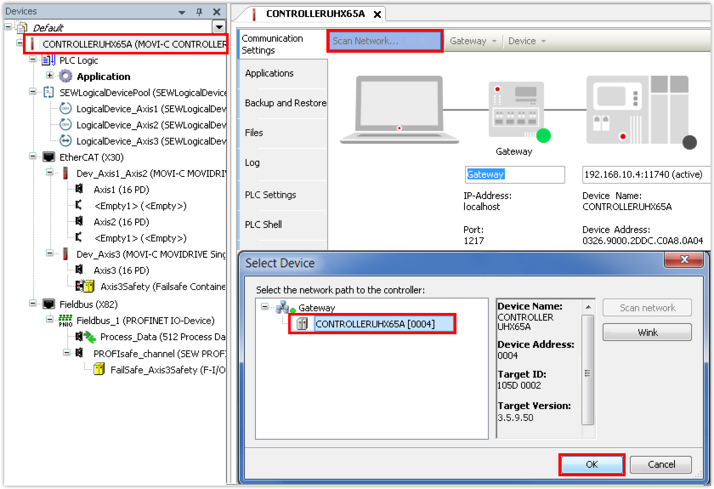
- Search the network and accept the controller found. If the controller is not found, enter the IP address of the controller in the IP address field.
- Once the connection to the controller is established, compile the IEC program and transfer it to the controller.
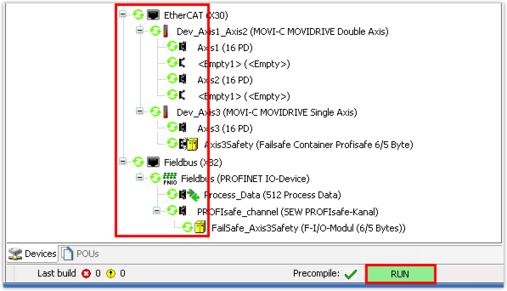
- Start the IEC program.
- The devices in the device tree are marked by a green circle. The green circle indicates fault-free function of the fieldbus option but does not indicate the state of communication between the controller and the PLC.
- Create a boot project. This way, the IEC Editor project is stored on the memory card of the controller and is still available after a restart of the controller.

- The controller can now be integrated into the PROFINET network in the engineering tool of the PLC.
