Startup with MWA21A option

WARNING

Electric shock from capacitors that have not been fully discharged.
Severe or fatal injuries.
- Disconnect the inverter from the power. Observe the minimum switch-off time after disconnection from the supply system:
- 1 minute
- Remove the MOVIMOT® inverter from the connection box.
- Check whether the MOVIMOT® drive is installed correctly both mechanically and electrically.
- Refer to chapters "Mechanical Installation" and "Electrical Installation".
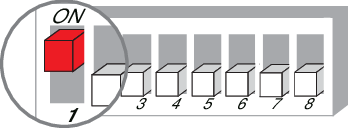
- Set DIP switch S1/1 of the MOVIMOT® inverter to "ON" (= address 1).
- Set the minimum frequency fmin using the switch f2.


f2 switch: | |||||||||||
|---|---|---|---|---|---|---|---|---|---|---|---|
Detent position | 0 | 1 | 2 | 3 | 4 | 5 | 6 | 7 | 8 | 9 | 10 |
Minimum frequency fmin [Hz] | 2 | 5 | 7 | 10 | 12 | 15 | 20 | 25 | 30 | 35 | 40 |
- Set the ramp time using switch t1.
- The ramp time is based on a setpoint step change of 1500 min-1 (50 Hz).

t1 switch | |||||||||||
|---|---|---|---|---|---|---|---|---|---|---|---|
Detent position | 0 | 1 | 2 | 3 | 4 | 5 | 6 | 7 | 8 | 9 | 10 |
Ramp time t1 [s] | 0.1 | 0.2 | 0.3 | 0.5 | 0.7 | 1 | 2 | 3 | 5 | 7 | 10 |
- Check to see if the required direction of rotation has been enabled.
Clockwise/stop | Counterclockwise/stop | Meaning |
|---|---|---|
Activated | Activated |
|
| ||
Activated | Not activated |
|
| ||
Not activated | Activated |
|
| ||
Not activated | Not activated |
|
| ||




- Place the MOVIMOT® inverter onto the connection box and screw it in place.
- Set the required maximum speed using setpoint potentiometer f1 of the MOVIMOT® inverter.
- Make sure the screw plug of the setpoint potentiometer has a seal and screw it in.
- Select the signal type for the analog input (terminals 7 and 8) of the MWA21A option using switches S1 and S2.
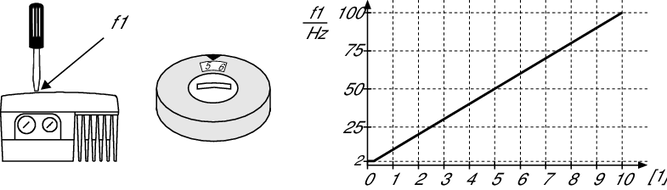
| [1] | Potentiometer setting |
S1 | S2 | Stop by setpoint function | |
|---|---|---|---|
U signal = 0 – 10 V | OFF | OFF | No |
I signal = 0 – 20 mA | ON | OFF | |
I signal = 4 – 20 mA | ON | ON | Yes |
U signal = 2 – 10 V | OFF | ON |
- Switch on the DC 24 V control voltage and the line voltage.
- Enable the MOVIMOT® drive. This means applying 24 V to terminal 4 (CW rotation) or terminal 5 of the MWA21A option.
INFORMATION