Mounting the COG11A door mounting frame
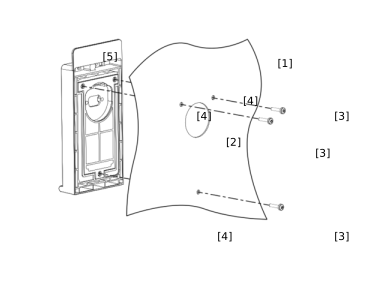

Proceed as follows:
- Fasten the drilling template to the mounting surface [1].
- Center punch the 5 mm bore [4] for the screws [3] and the 40 mm bore [2] for the D‑sub plug connector using the drilling template.
- Remove the drilling template.
- Drill the bores.
- Clean the mounting surface [1].
- Place the door mounting frame [5] from outside onto the mounting surface [1].
- Fix the door mounting frame in place using the screws [3] supplied (max. 2.5 Nm).
- If you are using a UKS52A cable, insert the port saver from behind through the 40 mm bore [2] and tighten the screws evenly.
- Insert the D-Sub connection cable from behind through the 40 mm bore [2] and tighten the screws evenly.
- Connect the connection cable to the inverter and tighten the screws evenly.
- Open the cover.
- Insert the keypad and perform a functional check.
- Close the cover and tighten the cover screw (1.2 – 1.4 Nm).
