Start manual mode
- The Python script was executed.
- The IEC project is loaded onto the MOVI-C® CONTROLLER after logging in.
- The basic startup has been performed successfully.
- In the IEC Editor, select the menu command "Online" > "Reset cold".
- A window is displayed.
- Confirm your entries.
- A reset is performed on the MOVI-C® CONTROLLER.
- Start the program on the MOVI-C® CONTROLLER using the [Start] button or the "Debug" > "Start" menu command.
- The IEC program starts on the controller. The "INIT" actions are executed in the "User_PRG" system program.
- If you have not opened the SCM startup plug-in, double-click the EtherCAT® station of the desired axis. Click the [SCM-StartUp] button.
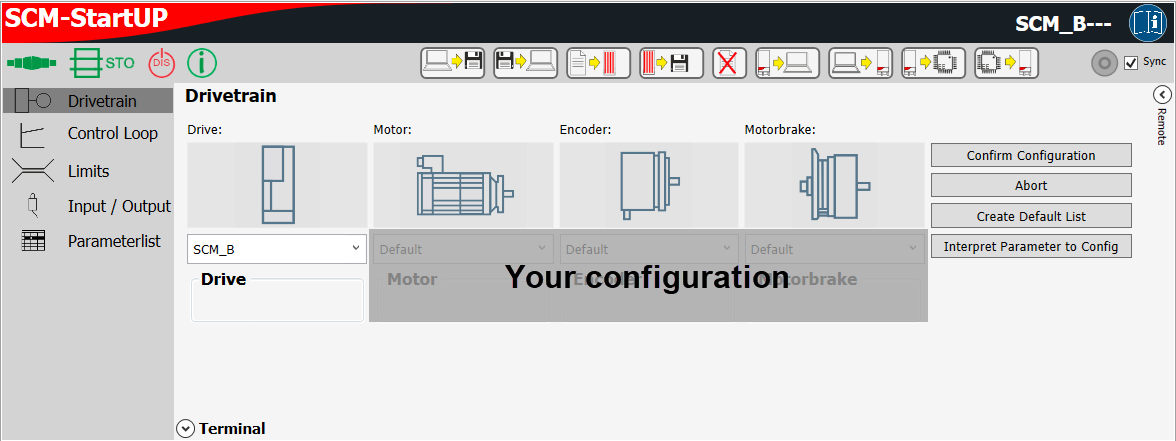
- The SCM startup plug-in window is displayed.
- Click the [Remote] button under Drivetrain within the SCM startup plug-in.
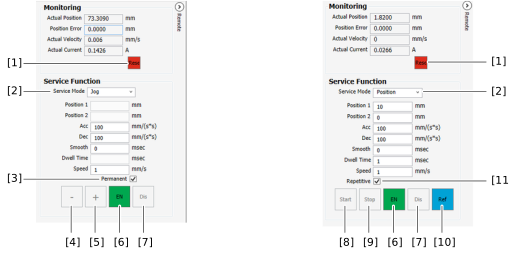
- The "Monitoring" and "Service Function" of manual mode are displayed.

No. | Description |
|---|---|
[1] | If the axis is inhibited, an active error can be reset. |
[2] | The operating mode can be selected via the drop-down list. Buttons are visible depending on the selected mode. Depending on the condition, buttons can be grayed out. |
[3] | Activated check box: The motor rotates continuously when the direction of rotation is actuated. Deactivated check box: The motor does not rotate permanently when the direction of rotation is actuated. |
[4] | If the axis is enabled, the motor can be turned counterclockwise. |
[5] | If the axis is enabled, the motor can be rotated clockwise. |
[6] | Enable the axis. |
[7] | Lock the axis. |
[8] | Start positioning. |
[9] | Stop positioning. |
[10] | Perform referencing (homing) of the axis. The axis must be inhibited. |
[11] | Activated check box: In positioning mode, oscillation mode is activated and the axis moves back and forth between position 1 and position 2. |
- You can use the "Service Function" to specify the setpoints and let the motor rotate. Observe the description of the buttons of manual mode. You can read the actual values in Monitoring.
INFORMATION