Touchprobe function – length measurement
This function can be used to determine the length of bulk material. The corresponding sensor, for example a light barrier is connected to touchprobe input DI 04 for this purpose. If the length measurement function is activated, the length is determined between two rising edges of the TP input and is output on the process data words "Measured length". The length measurement is performed in application mode 200 (speed control). The following settings must be made for the length measurement: Movikit positioning/touchprobe 1/event: Rising and falling edge.
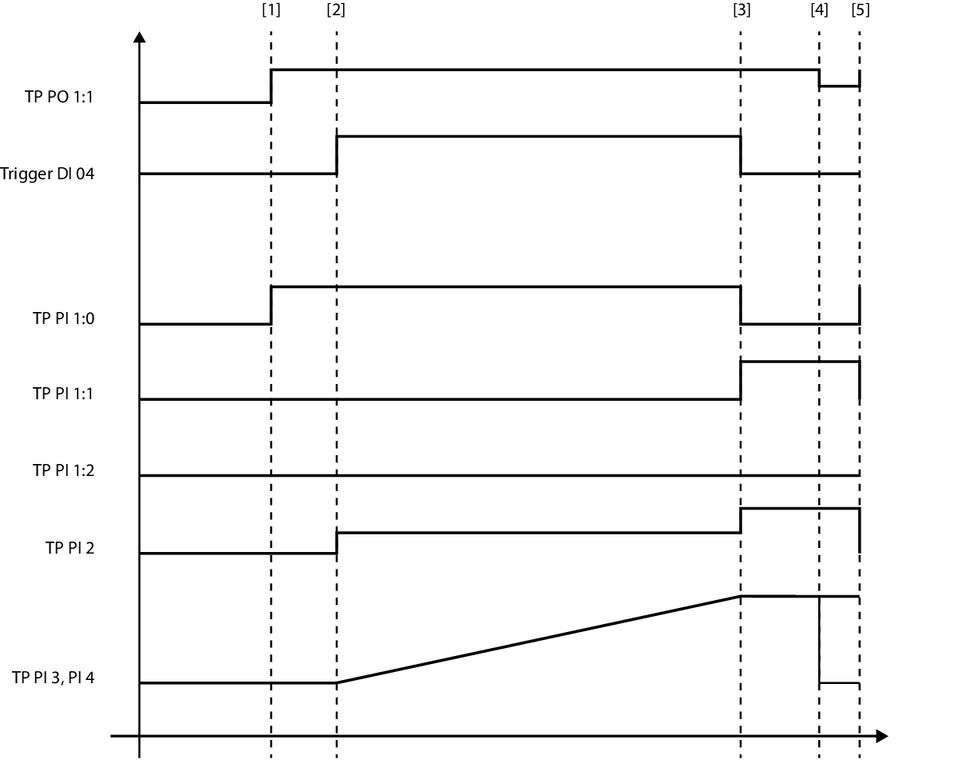

TP PO1:1 | Activate length measurement |
TP PI 1:0 | Wait for trigger |
TP PI 1:1 | Trigger activated |
TP PI 1:2 | Maximum position reached |
TP PI 2 | Counter touchprobe 1 |
TP PI 3, PI 4 | Measured length |
No. | PD | Signal states | |
|---|---|---|---|
[1] | Activate length measurement When activated, the feedback "Wait for trigger" (TP PI 1:0) is set. | TP PO1:1 | "0": No trigger event is evaluated "1": The system waits for a trigger event. |
[2] | Trigger After a rising edge at the TP input, the trigger counter is increased by 1 (TP PI 2). The detected length from this trigger is continuously output via TP PI 3 and PI 4. | The acquisition of the trigger signal is set in the configuration. | |
[3] | Trigger After a falling edge at the TP input, the trigger counter is increased by 1 (TP PI 2). The "Trigger activated" (TP PI 1.1) is set. The detected length between the two trigger signals is output via TP PI 3 and PI 4. | ||
[4] | Deactivate length measurement When activated, the feedback "Wait for trigger" feedback (TP PI 1:0) is reset. Additionally, the recorded length in TP PI 3/4 is deleted. | TP PO1:1 | |
[5] | Activate length measurement again When activated, the "Wait for trigger" feedback (TP PI 1:0) is set and the length measurement can be performed again. | TP PO1:1 |
INFORMATION