Configuring binary devices
The inverter must be added to the TIA Portal project, connected with the PLC, and configured.
The configuration of the AS-Interface devices is not determined by the device profile, but by the slots of the AS-Interface master.
Proceed as follows:
- The device type and device profile are set via DIP switches on the inverter (see Setting the device type with DIP switches. Note that changing the DIP switch position will also change the device address.
- The inverter is supplied with line voltage and/or DC 24 V backup voltage.
- The inverter is addressed (see Setting the inverter address).
- You have added the AS‑Interface master from Bihl+Wiedemann to the TIA Portal project.
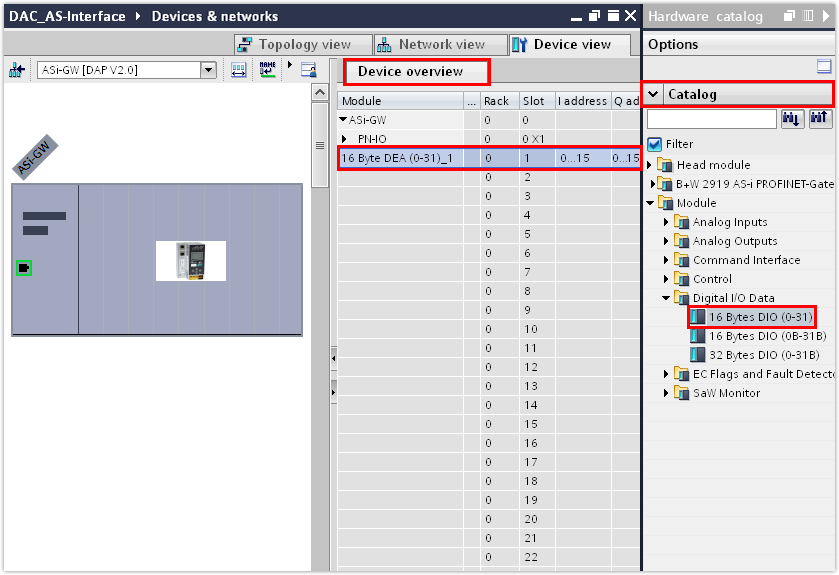
- Insert a digital module from the hardware catalog into the slots of the AS-Interface master for all binary devices.
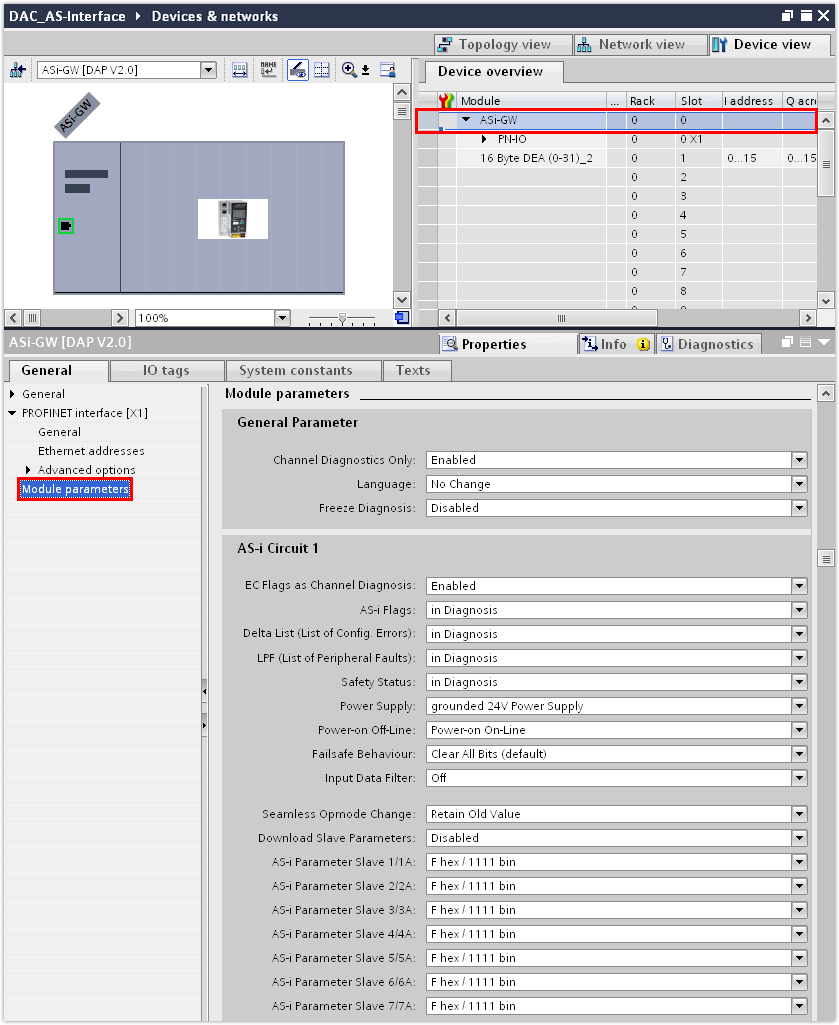
- In the inspector window (lower editor section), check the settings of the parameter bits in the "Module parameters" group.
- The parameter bits are set by default.
- If you are using the MOVIKIT® BinaryTablePositioning Drive software module, the parameter bits are part of a control word and thus have a direct impact on the operating behavior of the drive. In this case, revoke the parameter bits.
- Assign a PROFINET device name to the AS-Interface master (PROFINET device) and enter its IP address parameters.
- Switch to the control panel of the master or to the web server function. Start up the AS‑Interface configuration by first checking the status of the current configuration using the "config error LED" and then executing the "Quick Setup" function if necessary. For further information, refer to the documentation supplied by Bihl+Wiedemann.
- Save the TIA Portal project.
- Compile the TIA Portal project and load the project to the PLC.
- To check the settings that have been transferred from the TIA Portal project, switch to the MOVISUITE® project.
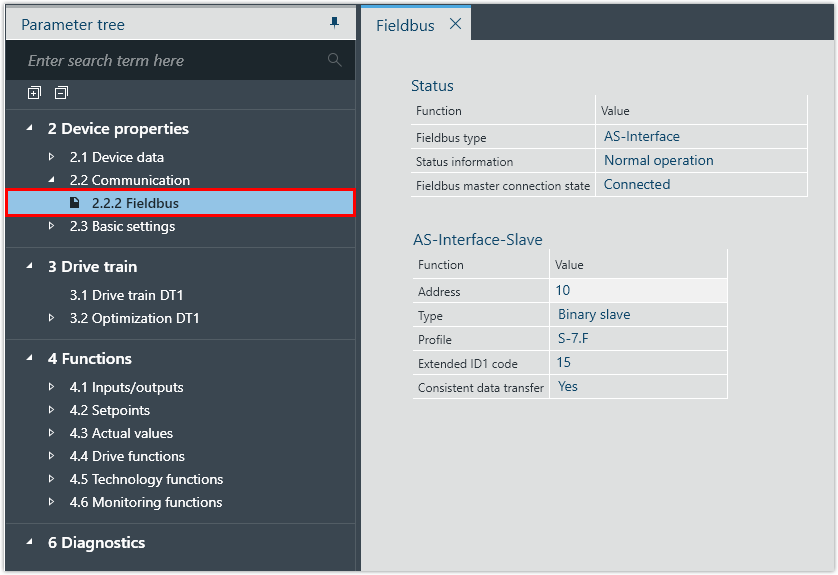
- Check the device address, device type and device profile under [Device properties] > [Communication] > [Fieldbus].
- In this example, the following device parameters have been transferred from the TIA Portal project:

INFORMATION

For information regarding the assignment of input data bits and output data bits to the AS-Interface devices, refer to the documentation supplied by Bihl+Wiedemann.
INFORMATION
To ensure that the device name of the inverter is compliant both with PROFINET and IEC61131, SEW‑EURODRIVE recommends using a name that starts with a letter and does not contain any spaces or control characters (hyphen, underscore, period, colon, comma, slash, backslash).
When the MOVISUITE® project is imported into TIA Portal, TIA Portal converts the name of the inverter according to an internal algorithm. A name according to the defined naming conventions ensures that the inverter appears under the same name in the various tools.
If a name according to the naming conventions is not possible, select a PROFINET‑compliant name. In this case, IEC61131 compliance is automatically ensured by MOVISUITE®.
Parameter | Value |
|---|---|
Address | 10 |
Type | Binary devices |
Profile | S‑7.F |
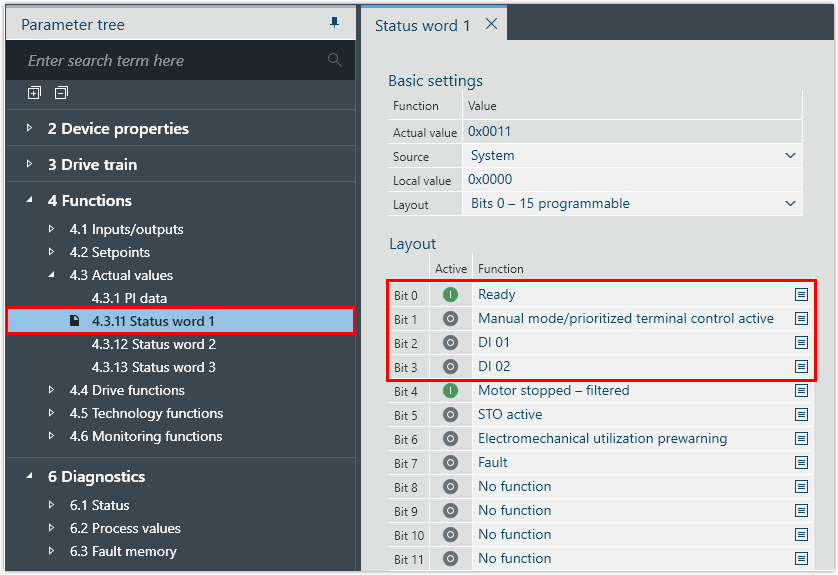
- Check the current state of the input data bits under [Functions] > [Actual values] > [Status word 1]. In the case of a binary device (number of data bits 4 DI/4 DO), only the first 4 status bits are transmitted.
- In this example, the following functions have been assigned to the inputs of the inverter:
Input data bit | Status bit | Function |
|---|---|---|
E128.0 | Bit 0 | Ready |
E128.1 | Bit 1 | Manual mode |
E128.2 | Bit 2 | DI 01 |
E128.3 | Bit 3 | DI 02 |
- Check the current state of the output data bits under [Functions] > [Setpoints] > [Control word 1]. In the case of a binary device (number of data bits 4 DI/4 DO), only the first 4 control bits are transmitted.
- In this example, the following functions have been assigned to the outputs of the inverter:
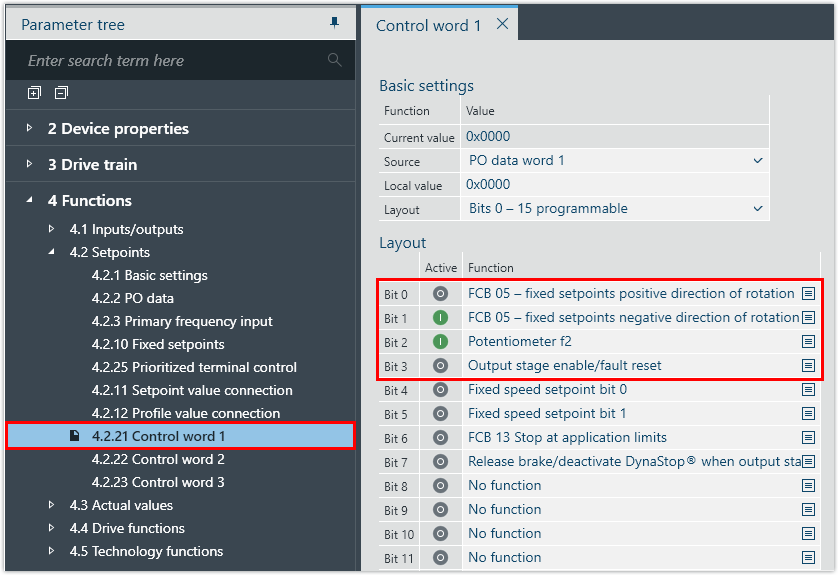
Output data bit | Control bit | Function |
|---|---|---|
A128.0 | Bit 0 | FCB 05 – fixed setpoints, positive direction of rotation |
A128.1 | Bit 1 | FCB 05 – fixed setpoints, negative direction of rotation |
A128.2 | Bit 2 | Potentiometer f2 |
A128.3 | Bit 3 | Output stage enable/fault reset |
