Device configuration
- In the "Scan list", click the
 button.
 - All devices detected in the network are displayed in the "Scan list". Go to Options for the scan settings.
- Move the devices you want to use for data acquisition from the "Scan list" to the "Devices/groups" area using drag and drop.
- In the "Devices/groups" area, select the device that you want to configure for data acquisition.
- The properties of the selected device are displayed in the window on the right.
- Configure the data acquisition with the device settings.

INFORMATION

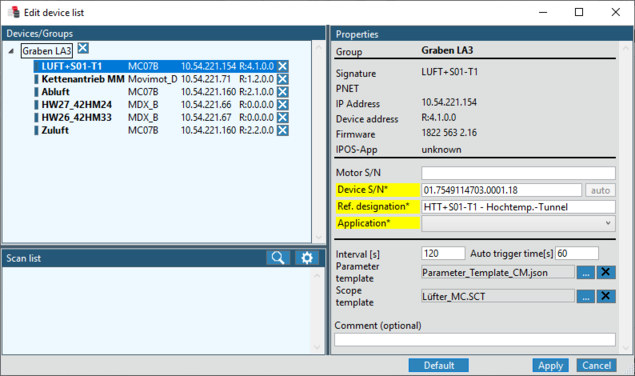
The fields marked in yellow are mandatory fields. When configuring the mandatory fields, the values must be unique across all devices, as they are used for device identification. If supported by the devices, the values are preset when the scan takes place.
If a MultiTemplate is used, no scope template is entered in the device list.
The following properties and settings are available for the devices:
Property | Description |
|---|---|
Group – group assignment of the device. See Grouping devices | |
Signature | Signature of the device |
PNET | PROFINET address of the device in the network |
IP address | IP address of the device in the network |
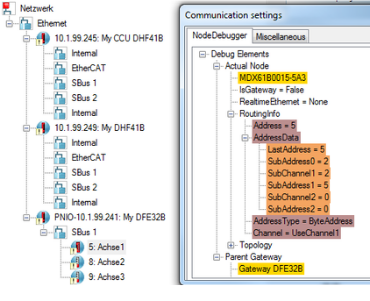
Device address | Device address in the network IP addresses as well as subaddresses and subchannels are used to uniquely identify the device in the network. For a better overview, you can display the communication settings in MOVITOOLS® MotionStudio using the keyboard shortcut "Ctrl + Shift + K" for each device in the network.
|
Firmware | Firmware version of the device |
IPOS App – designation of the IPOS application | |
Motor part number | Serial number of the motor (completed automatically if applicable) |
Device part number* | Serial number of the device (completed automatically if applicable) The [auto] button is used to insert a generated value if no serial number is available in the devices. The generated value consists of a randomly generated part, the IP address and the subroute. |
Ref ID/OR ID* | Reference ID/operating resource ID of the device |
Application* | Application to which the device is to be assigned (e.g. for structuring the data to be recorded for evaluation). The list of applications can be edited in the "General" tab via [Edit application name]. |
Recording parameters | |
Interval [s] | Interval for automatic data acquisition in seconds |
Auto trigger time [s] | Auto-trigger time until start of data acquisition in seconds. Trigger time for systems where triggering directly via scope is not possible (e.g. with S1 duty types). The trigger time is relative and results from: Interval [s] – Auto trigger time [s] |
Parameter template | Select a file listing the device parameters that will be recorded once the interval has elapsed. Select a parameter template by clicking the [...] button. Parameter templates are stored in the directory |
Scope template | Select a file containing the settings for the scope recording. For more information on creating the file, refer to chapter Scope templates. If you want to assign several scope templates to one device, observe the notes regarding the "MultiTemplate" tab in chapter Options. If the check box "Parameterize inverter before start" is activated in the "Scope" tab of the Options, the content of the scope template is transferred to the inverter before each start. |
Comment | Other comments |