Installing the IEC package
Since the IEC Editor on the engineering PC has no information about the SEWEURODRIVE visualization device, the device description must be installed for startup of the SEW-EURODRIVE MOVIKIT® Visualization solution. Only in this way can the SEW-EURODRIVE visualization device be integrated into an IEC visualization project and recognized as a visualization device in a network. The installation is carried out via an IEC package provided in Online Support.
INFORMATION

If the installation is started by double-clicking the IEC package file and selecting the "Complete installation" option, the IEC package is automatically installed in the latest installed version of the IEC Editor. Since the version of the IEC Editor for the control part must correspond with the version of the IEC Editor for the visualization, it is recommended to open the required IEC Editor and to carry out the installation via the integrated package manager (see following instructions).
Proceed as follows to install the IEC package:
- Open the IEC Editor on your engineering PC.
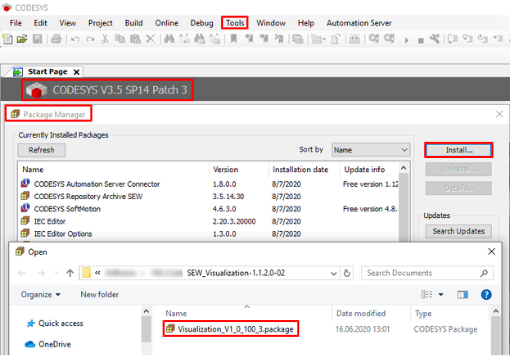
- Open the [Package Manager...] menu from the [Tools] menu.
- In the Package Manager, click the [Install...] button.
- A window for selecting the IEC package file is displayed.
- Select the IEC package file and click [Open].
- The installation wizard is displayed.
- Follow the instructions of the wizard in full. Select the "Complete installation" option as the installation type.

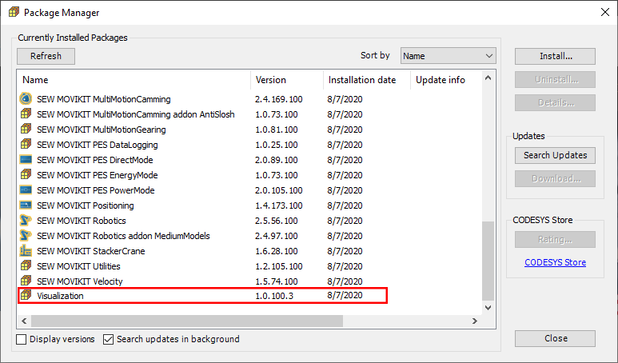
- The IEC package has been successfully implemented on the engineering PC and is displayed in the Package Manager.
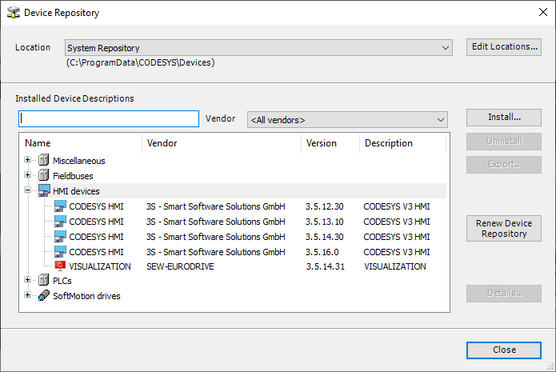
- The "Visualization" device is available in the IEC Editor via [Tools] > [Device Repository] under "HMI Devices" and can be integrated into the IEC project.