Assigning administrator rights
After having installed the visualization and running Visualization.exe, running as administrator must be activated for the SMID licensing for the application. Proceed as follows to activate administrator authorization:
- Start the visualization by double-clicking the respective icon on your desktop.
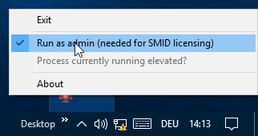
- Open the visualization context menu in the information area of the taskbar (tray icons).
- Activate entry "Run as admin (needed for SMID licensing)" in the context menu.
- Click the "Exit" entry in the context menu.
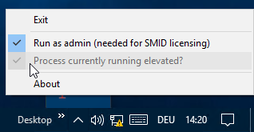
- A user account control (UAC) message will be displayed the next time the visualization is started. After confirming the message, the process is carried out with administrator authorization, and the entry "Process currently running elevated?" entry is activated in the information area of the context menu of the visualization.