Resetting the Windows section
The Windows part of the MOVI-C® CONTROLLER can be reset to the delivery state by importing a recovery image.
A corresponding recovery image is available as a download from the Online Support on the SEW‑EURODRIVE website.
INFORMATION

Since the OMW CFast memory card is completely erased when applying the recovery image, license files should be backed up beforehand. Contact SEW‑EURODRIVE Service in this case.
After applying the recovery image, the license file must be saved again in the same directory. If this folder structure is not displayed, hidden folder items may need to be displayed using the Windows Explorer view options.
Reading the recovery image
The following preconditions must be met so that the recovery image can be applied:
Hardware / software | Description |
|---|---|
Recovery image package | Recovery image to be imported (e.g. |
OMW CFast memory card | Memory medium for the recovery image |
Card reader for the | Transfer of the recovery image to the OMW CFast memory card |
Administrator authorization on the engineering PC | Write permissions (for transfer) of the recovery image to the OMW CFast memory card |
Engineering PC with Windows 10 installed | Start implementation of the recovery image on the OMW CFast memory card (only possible with Win10 Engineering System!) |
Carry out the following steps to import the recovery image:
- Insert the OMW CFast memory card into the card reader and connect the card reader to your engineering PC.
- The OMW CFast memory card is recognized as a new drive.
- Make a note of the drive letter assigned to the OMW CFast memory card for a later installation step. Incorrect entries can halt the installation or, in the worst case, delete another memory medium and subsequently install the recovery image on that memory medium.
- Unzip the recovery image into any directory on the engineering PC.
- The directory with the unzipped files must contain the
Start_Recovery.batfile. For more information, refer to theReadme.txtfile that is also included. - Right-click the
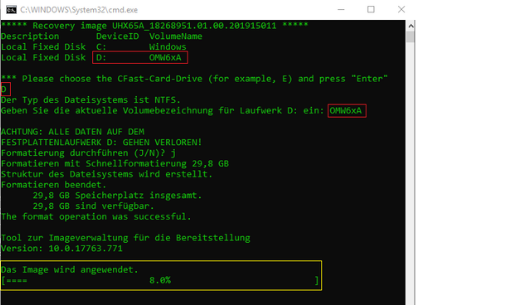
Start_Recovery.batfile to open the shortcut menu and select the [Run as administrator] menu item to start the installation of the recovery image with administrator rights. - The console window for installing the recovery image opens and lists all available drives.
- You are prompted to enter the drive letter of the OMW CFast memory card.
- Enter the drive letter of the OMW CFast memory card (here: "D:") and confirm your entry by pressing [Enter].
- You are prompted to enter the volume name of the OMW CFast memory card.
- Enter the volume name of the OMW CFast memory card (see list at the beginning of the installation) (here: OMW6xA) and confirm your entry by pressing [Enter].
- A message is displayed that all data on the OMW CFast memory card will be deleted, and information about the installation is provided.
- To confirm the installation note, enter "y" and confirm your entry with [Enter].
- The recovery image is installed. This can take some time. The progress of the operation and the successful completion of the transfer is displayed in the command line window.