Setting right-click
On touchscreens, it is often configured by default that a long press of a key is interpreted as a right click. This setting should be deactivated when using the visualization on a touchscreen in order to make operating procedures that require a long key press (e.g. manual movement of a conveyor belt or axis) possible without interruption and therefore more practical.
For this purpose, carry out the following steps:
- The Windows operating system is open on the touchscreen.
- Open the "Pen and Touch" menu via the Control Panel.
- Switch to the "Touch" tab and select entry "Press and hold" in the "Touch actions" box.
- Click [Settings].
- The "Press and Hold Settings" menu is displayed.
- In the "Press and Hold Settings" menu, deactivate the "Enable press and hold for right-clicking" check box.
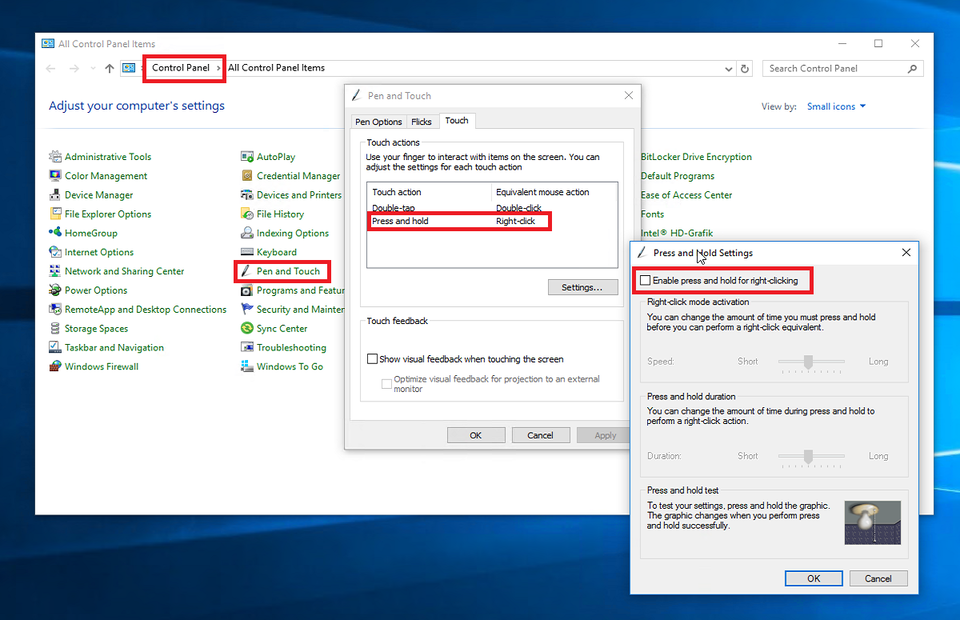

- A long button press is no longer interpreted as a right click on the touchscreen.
