MOVISUITE® license manager
With the MOVISUITE® license manager it is possible to check the licenses currently installed, install new licenses, and activate purchased licenses. Based on the compiled IEC project, missing licenses will be indicated.
Start the MOVISUITE® license manager for the currently selected device via [Tools] > [License manager]
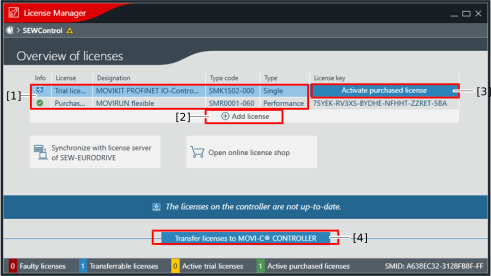

[1] | Overview of the existing and missing licenses. Missing licenses are only shown if an IEC project has been loaded and started. |
[2] | Missing licenses can be added with "Add license". |
[3] | Trial licenses can be converted into purchased licenses via "Activate purchased license" with the corresponding activation code. |
[4] | After licenses are added or activated, they must be transferred to the controller. A 24 V reset of the controller is then absolutely necessary. |
