Step 1: Installing the GSD file
A device description file (GSD) is provided for the configuration of the ECC-DFC fieldbus controller. You can download the latest edition of the GSD from the SEW‑EURODRIVE website (www.sew‑eurodrive.com).
GSDML-V2.31-SEWEURODRIVE-ECCJJJJMMTT.xml ("JJJJMMTT" (YYYYMMDD) stands for the date of the file).
- Start the TIA Portal and switch to the project view.
- You can install the GSD under "Tools/Manage Device Description File (GSD)".
- You will then find the IO device ECC-DFC under [Other field devices/PROFINET IO/I/O/SEW Eurodrive/ECC-DFC-24-00].
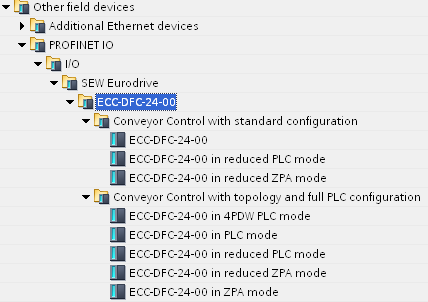

In the GSD, there are 2 folders with the names "Conveyor Control with standard configuration" and "Conveyor Control with topology and full PLC configuration". The relevant access points [1] (DAPs/Device Access Points) are listed in each of these folders.
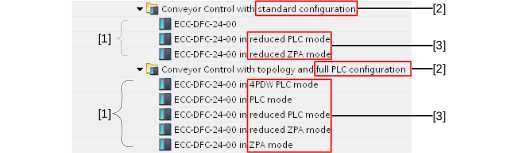
[1] | Access points (DAPs) |
[2] | Configuration types |
[3] | Operating modes |
