Without an Internet connection
Proceed as follows to activate the software license:
- There is an active connection between MOVISUITE® and the MOVI-C® CONTROLLER.
- You have purchased one or more software licenses and the associated license keys and activation keys have been sent to you. For further information, refer to chapter Receiving an activation key.
- Establish an active connection between your engineering PC and the MOVI-C® CONTROLLER.
- Switch to the "Startup" work phase.
- Open the License Manager.
- Select the software license you wish to activate.
- Click the [Activate license] button.
- The "Activate license" window opens.
- In the "Activate license" window, select the "Activate license by phone" radio button.
- Enter the relevant license key and the matching activation key.
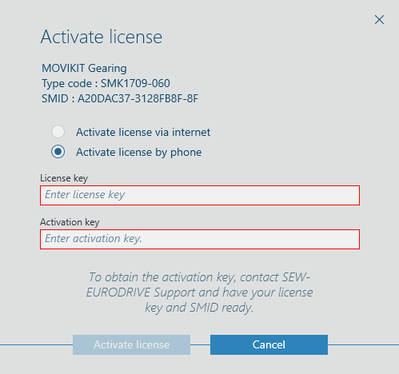
- To perform the activation, click the [Activate license] button.
- MOVISUITE® checks the data you have entered and displays an appropriate message.
- To complete activation and to transfer the software licenses to the memory card, click the [Transfer licenses to MOVI-C® CONTROLLER] button.
- Restart the MOVI-C® CONTROLLER for the changes to take effect.
