With an Internet connection
Proceed as follows to activate the software license:
- The engineering PC has an active Internet connection.
- There is an active connection between MOVISUITE® and the MOVI-C® CONTROLLER.
- You have purchased one or more software licenses and the associated license keys have been sent to you.
- Right-click to open the context menu of the MOVI‑C® CONTROLLER.
- Click the menu item [Tools] > [License Manager].
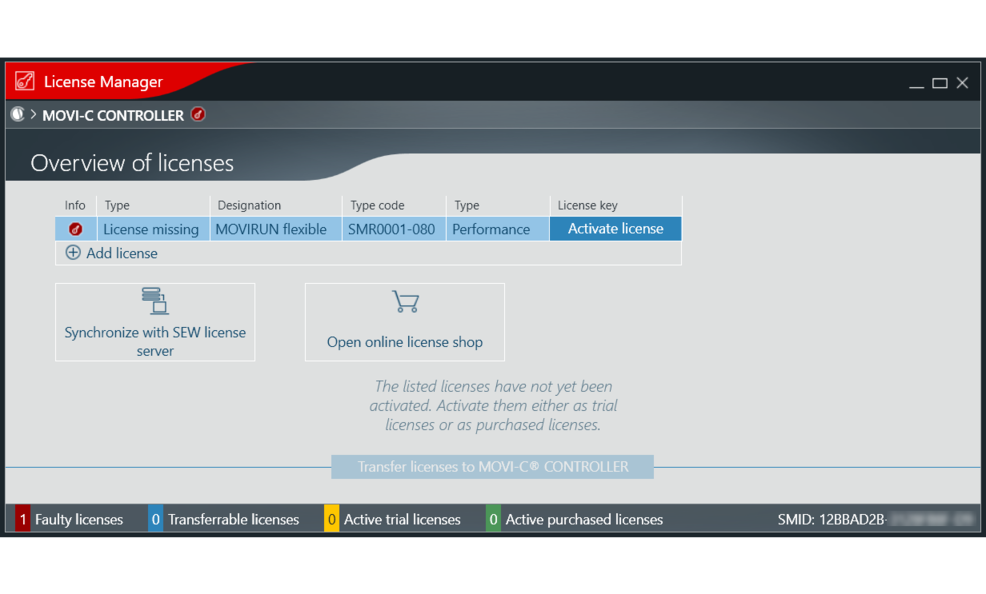
- In the list in the License Manager, click the [Activate license] button for the software license you wish to activate.
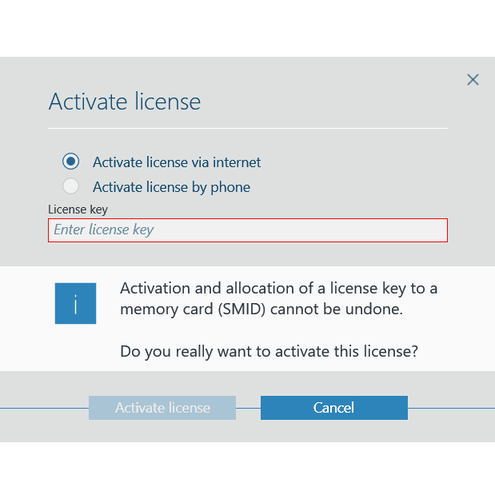
- The "Activate license" window is displayed.
- In the "Activate license" window, select the option "Activate license via Internet".
- Enter the relevant license key. The SMID of the memory card which is used is read automatically by the License Manager and displayed.
- To perform the activation, click the [Activate license] button.
- MOVISUITE® establishes a connection to the SEW license server and registers the software license.
- The software license is now linked to the memory card. The entered license key is used up and cannot be used for any other memory card. This procedure cannot be undone.
- To activate further software licenses, repeat the previous steps.
- To complete the activation process and to transfer the software licenses to the memory card, click the [Transfer licenses to MOVI-C® CONTROLLER] button.
- Restart the MOVI-C® CONTROLLER for the changes to take effect.