MOVIKIT® diagnostics
All MOVIKIT® software modules are equipped with a diagnostic monitor to enable quick startup and testing of the control as well as the application. In addition to monitor mode, the diagnostic monitor also provides a control mode that can be used to control the functions of the software module in MOVISUITE®.
The user interface of MOVIKIT® diagnostics is structured as follows:
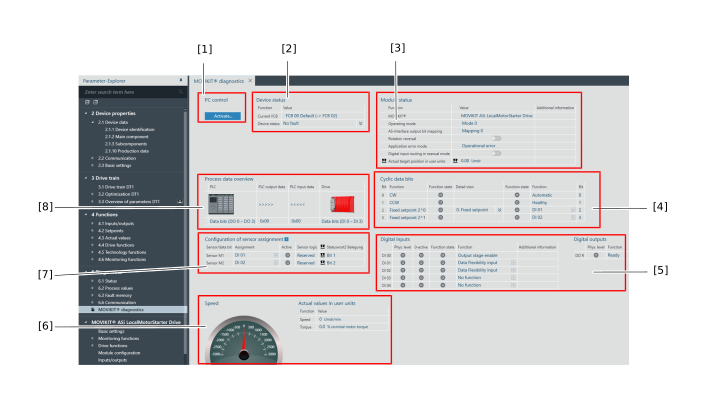

[1] | Button for toggling between "PC control" and "Monitor mode" |
[2] | Device status |
[3] | Module status |
[4] | Overview of cyclic data bits |
[5] | Overview of digital inputs and digital outputs |
[6] | Actual value in user units |
[7] | Overview of the sensor assignment configuration |
[8] | Overview of process input and output data |
Additional information
